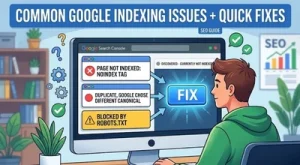
If your website pages are not appearing on Google search results, you may be facing common Google indexing issues inside Google Search Console. Understanding these indexing problems is important for improving website visibility, organic traffic, and overall SEO performance of the website.
In this guide, we will cover the most common GSC indexing issues, what the issues are, and how to fix them quickly for better search engine indexing results.
For more SEO and digital marketing insights, visit DigiAdGalla.
Why Google Indexing Matters for SEO
Google indexing is the process where Google crawls, understands, and stores your webpages in its search database. If a page is not indexed, it cannot appear in Google Search results, which directly impacts organic traffic and website visibility.
Many website owners face Google indexing issues because of poor technical SEO, weak internal linking, duplicate content, crawl budget problems, or low quality pages. Regular checking the Google Search Console helps identify indexing errors before they affect rankings and search performance.
How To Check Google Indexing Issues in GSC
You can identify Google indexing issues inside the “Pages” report in Google Search Console. This report shows indexed pages, excluded pages, crawling problems, duplicate pages, and indexing warnings affecting your website.
To check indexing problems:
- Open Google Search Console
- Click “Pages” under Indexing
- Review “Not Indexed” pages
- Click individual issues to inspect affected URLs
- Use URL Inspection Tool for deeper analysis
Regular monitoring helps improve crawlability, indexing speed, and overall SEO performance.
Common Google Indexing Issues
1. Crawled – Currently Not Indexed

What It Means
One of the most common Google indexing issues in Google Search Console is “Crawled – Currently Not Indexed.” When GSC shows ‘Crawled – Currently Not Indexed,’ it means Google found the page but didn’t add it to the index, usually because of low quality or duplicate content.
How to fix it
To fix this, add internal links, improve content depth to make it more useful, write original content instead of copying from other sources, and then request indexing in GSC again.
Additional Tips
- Improve page uniqueness and originality
- Add FAQs, visuals, and examples
- Increase topical authority with related content
- Avoid publishing AI generated thin pages without value
- Strengthen internal linking from high authority pages
Pages with weak content quality are often crawled but skipped from Google’s index because Google prioritizes useful and original information for users.
2. Discovered – Currently Not Indexed
What It Means
When GSC shows ‘Discovered – Currently Not Indexed,’ it means Google knows the page exists but hasn’t crawled it yet, often due to crawl budget limits.
How to fix it
To fix this problem strengthen your internal links, add backlinks, and update the sitemap of your website.
This is one of the most common Google indexing issues for newly published pages or for websites with low authority, especially when the website has weak internal linking or poor crawl optimization.
Common Reasons Behind This Issue
- Newly launched websites
- Weak domain authority
- Large websites with crawl budget limitations
- Poor sitemap structure
- Low internal link distribution
Improving website authority and crawl signals can help Google crawl newly discovered pages faster.
3. Duplicate Without User Selected Canonical
What It Means
This means multiple pages of your website have similar content and Google can’t decide which one to index for users.
How to fix it
To fix this add a proper canonical tag to the desired page and reduce duplicate content issues.
Duplicate content is a major Google indexing issue because it confuses search engines and can split ranking signals between multiple similar pages.
4. Alternate Page With Proper Canonical
What It Means
It means the page isn’t indexed because another page has been designated as the canonical, or preferred, version instead.
How to fix it
To fix this, check that the canonical tag is set correctly and points to the right page.
5. Blocked By Robots.Txt

What It Means
Googlebot is being blocked from crawling the page, meaning your robots.txt file is instructing Google not to access it.
How to fix it
Remove blocking lines from robots.txt if you want it to be indexed.
Important Robots.txt Mistakes To Avoid
- Blocking important category or blog pages
- Blocking CSS and JavaScript files
- Blocking images required for rendering
- Accidentally disallowing the entire website
Incorrect robots.txt configurations are one of the most common technical SEO mistakes affecting Google indexing.
You can learn more about robots.txt guidelines from Google Search Central.
These Google indexing issues can significantly reduce crawlability and prevent important webpages from appearing in search results when robots.txt rules are configured incorrectly.
6. Noindex Tag Present
What It Means
This means a “noindex” command given by you is preventing your page from indexing.
How to fix it
To fix it just remove that “noindex” meta tag for the pages that should be indexed in search.
7. Soft 404 Error
What It Means
Soft 404 error means that page exists but has thin or irrelevant content, so Google treats it like a 404.
How to fix it
To fix it improve content or properly return a 404 status if it is not needed.
8. Redirect Error (3xx/Loop)
What It Means
Redirect Error means redirect chains or loops will not be crawled and indexed.
How to fix it
Fix redirect loops and limit to one clean 301 redirect.
9. Server (5xx) Errors
What It Means
This error means server downtime or errors blocked Googlebot.
How to fix it
To fix server configuration, reduce response time, and retry indexing.
10. Page Removed With 404/410
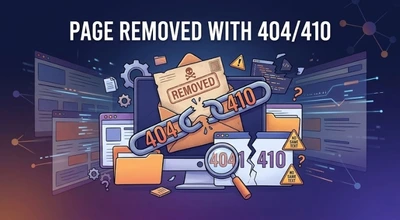
Pages returning 404 or 410 status codes are among the most common Google indexing issues because search engines remove unavailable or deleted URLs from the search index over time.
What It Means
This type of Google indexing issue happens when a webpage is deleted, unavailable, or intentionally removed using a 404 or 410 status code, which makes it non-indexable in Google Search.
How to fix it
To fix it redirect to relevant page or recreate valuable content.
11. Blocked By Page Removal Tool
What It Means
It means the page is manually removed via Google’s URL Removal Tool.
How to fix it
To fix it wait for expiration or revoke removal request on GSC.
12. Canonicalized To Another Page
What It Means
It means that the page signals another URL as the main version.
How to fix it
To fix it keep only one main version for indexing and ensure that the canonical intent is correct.
13. Thin Content
What It Means
Thin content means that your page has very little unique or useful content for users.
How to fix it
To fix this add valuable information, visuals, FAQs, and relevant keywords to increase quality and improve SEO indexing in your content.
Signs Of Thin Content
- Very short pages with little useful information
- Duplicate or AI written content
- Pages with excessive ads and little value
- Empty category or tag pages
- Low engagement and high bounce rates
Improving content depth and user experience can significantly improve indexing and rankings.
14. Parameterized URLs
What It Means
URL variations, such as tracking parameters and filters, can confuse crawlers.
How to fix it
To fix it use canonical tags or Google’s parameter handling settings.
15. Mobile Usability Errors

What It Means
Mobile Usability Error is a common Google indexing issue where the page is not mobile friendly, reducing indexing priority and negatively affecting SEO rankings.
How to fix it
To fix this, fix mobile layout, font size, and load speed issues.
Mobile SEO Optimization Tips
- Use responsive website design
- Improve Core Web Vitals
- Optimize image sizes
- Avoid clickable elements placed too closely
- Use readable font sizes on mobile devices
Google uses mobile first indexing, which means the mobile version of your website is prioritized for crawling and indexing.
Use Google’s mobile friendly testing recommendations from Google Page Experience Guide.
16. Crawl Budget Wasted On Junk URLs
What It Means
Too many low value URLs consume Google’s crawl budget.
How to fix it
Block complex, tag, or duplicate URLs in robots.txt.
URLs That Commonly Waste Crawl Budget
- Filter and faceted navigation URLs
- Search result pages
- Tracking parameter URLs
- Duplicate tag/category pages
- Auto-generated archive pages
Managing low value URLs helps Googlebot focus on important pages that actually need indexing.
17. Sitemap Missing Important Pages
What It Means
This means sitemap doesn’t include priority URLs.
How to fix it
To fix this regenerate sitemap and submit updated version to GSC.
You can also explore more technical SEO solutions on DigiAdGalla SEO Services.
18. Orphan Pages
What It Means
This means your page isn’t linked from anywhere else on your site, there’s no way to reach it by clicking through from another page.
How to fix it
To fix this add internal links or include them in the sitemap. Internal linking helps Google discover pages faster and improves website indexing performance.
19. JavaScript Rendering Issues
What It Means
JavaScript rendering issues mean that JavaScript based content isn’t visible to Googlebot.
How to fix it
To fix this use server side rendering or pre rendered essential content.
Why JavaScript Causes Indexing Problems
Sometimes Googlebot cannot fully render JavaScript heavy websites, especially when important content loads only after user interaction. This can prevent Google from seeing text, links, images, or metadata required for indexing.
Using server side rendering, dynamic rendering, or pre rendered HTML can improve crawlability and indexing efficiency.
20. Recently Published But Not Indexed Yet
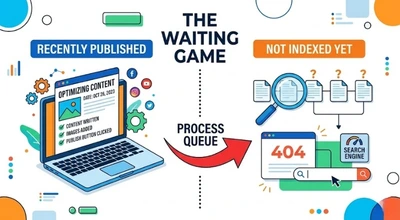
What It Means
This means that your page is recently published and is a fresh page which is not crawled yet.
How to fix it
Build internal links, share externally, and request indexing manually so that indexing happens quickly by Google.
Indexed But Not Ranking – What To Check
Sometimes pages get indexed successfully but still do not rank on Google. This usually happens because of weak SEO signals rather than indexing errors.
Common reasons include:
- Weak search intent targeting
- Poor backlink profile
- Thin or outdated content
- Weak internal linking
- Low topical authority
- High competition keywords
Improving content quality, updating information regularly, strengthening backlinks, and improving on-page SEO can help improve rankings after indexing.
FAQs
1. What are Google indexing issues?
Google indexing problems happen when Google cannot properly crawl, understand, or add webpages to its search index, which can reduce website visibility and organic rankings.
2. Why is my page discovered but not indexed?
This happens when Google knows about the page but delays crawling because of low authority of website or page, weak internal linking, or crawl budget limitations.
3. How can I improve my website’s crawlability?
You can improve crawlability by creating a clean sitemap, fixing broken links, improving website speed, and maintaining a proper internal linking structure.
4. How do Google indexing issues affect SEO?
Google indexing problems can prevent important pages from being visible in search results, negatively impacting website traffic, keyword rankings, and overall SEO performance.
5. What is the purpose of a canonical tag?
A canonical tag tells search engines which version of a page should be treated as the main version when similar or duplicate pages exist.
6. Why are orphan pages bad for SEO?
Orphan pages are difficult for search engines to discover because they are not connected through internal links, reducing their chances of ranking.
7. How often should I check Google Search Console?
It is recommended to check Google Search Console regularly to identify Google indexing issues, crawling problems, and website performance errors before they affect rankings and website traffic.
8. How long does Google take to index a page?
Google indexing can take anywhere from a few hours to several weeks depending on website authority, crawl budget, content quality, internal linking, and sitemap optimization. Submitting URLs through Google Search Console can sometimes speed up the indexing process.
9. Can mobile usability problems affect rankings?
Yes, poor mobile experience can affect user engagement, search visibility, and page performance because Google prioritizes mobile friendly websites.
Google Indexing Checklist
Use this quick checklist regularly to improve website indexing performance:
✔ Submit updated XML sitemap
✔ Fix broken internal links
✔ Remove accidental noindex tags
✔ Optimize page speed and mobile usability
✔ Improve content quality and originality
✔ Reduce duplicate pages
✔ Monitor crawl errors in GSC
✔ Add internal links to important pages
✔ Fix redirect loops and server errors
✔ Request indexing for updated pages
Consistent technical SEO maintenance helps improve crawling, indexing speed, and search visibility over time.
Common Causes Of Google Indexing Issues
The most common reasons behind Google indexing problems include:
- Low quality or duplicate content
- Weak internal linking
- Technical SEO errors
- Incorrect canonical tags
- Noindex directives
- Crawl budget wastage
- Poor mobile usability
- Slow website speed
- JavaScript rendering problems
- Blocked resources in robots.txt
Identifying the root cause early can help websites recover indexing performance faster and improve organic visibility.
Final Thoughts
Fixing common Google indexing issues is essential for improving website rankings, organic visibility, and crawl efficiency. Regularly checking Google Search Console, improving content quality, optimizing internal linking, and maintaining a clean sitemap can help pages get indexed faster.
Websites that regularly update content, maintain strong technical SEO, and improve user experience are more likely to achieve faster indexing and better long term search visibility in Google.
Proper keyword placement, keyword proximity, and content chunking can significantly improve your SEO performance while keeping content user-friendly.
For expert SEO strategies and digital growth solutions, explore DigiAdGalla.