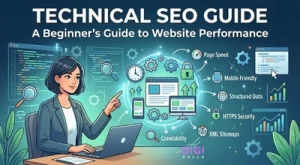
What is Technical SEO? – You write blogs. You use key words. You even build backlinks. But your site still doesn’t show up in search results or rank higher.
This is one of the most common problems that people who own websites have. In most cases, the problem isn’t with the content, it is a technical issue.
The first step to fix hidden problems that keep your website from showing up on Google is to understand what technical SEO is.
Technical SEO makes sure your website is easy to access, fast-loading, well organized, and properly set up for search engines to understand. This is the most important part of all SEO work.
If you are new to SEO, first understand the basics in our guide on On Page SEO for Beginners: 14 Rules to Rank Higher.
What is Technical SEO?
The goal of technical SEO is to make the technical parts of a website better so that search engines can crawl, understand, and index it better and quickly.

It focuses on the backend parts, not the On Page SEO, like for example:
- The structure of the website
- Speed of the page
- Mobile friendly website
- Safety Features
- Control of indexing
In short:
Technical SEO is like the “skeleton” of your on page SEO.
Even if your content is great, it might never rank if the technical foundation isn’t right.
To understand how SEO fits into overall marketing, read Digital Strategies Every Brand Needs in 2026.
Why Technical SEO is Important
Technical SEO has a direct impact on whether your website shows up in the search results or not.
Search engines can’t rank pages they can’t get to or can crawl.
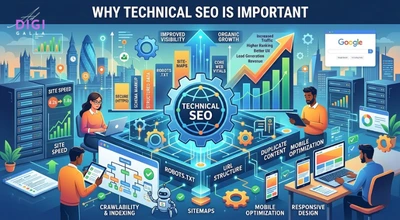
Main Reasons:
- Makes sure search engines can find your pages, this is the most direct way technical SEO affects whether your website appears in search results at all.
- Makes the experience better for users like faster loading time and easy to use website.
- Makes things visible and higher in the rankings
- Lowers the bounce rate
- Creates the foundation for long term SEO
Users quickly abandon slow or poorly structured websites because they don’t want to wait or work to find what they need.
How Search Engines Work
You need to know how Google works in order to really understand what is technical SEO:

1. Crawling
Search engines use bots to discover your pages by following links.
Bots may not find important pages on your site if it is not well structured or easy to access.
2. Indexing
After crawling, Google saves the pages in its database.
If your page is not indexed → it cannot rank.
3. Ranking
Google ranks pages based on how relevant, high quality, and easy they are to use.
Technical problems at any point can completely stop rankings.
This is exactly why getting the technical fundamentals right is essential for improving overall search performance.
Website performance also depends on hosting quality explore Best Web Hosting for WordPress in 2026
Core Pillars of Technical SEO
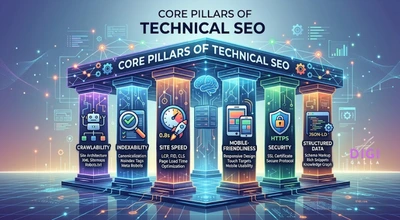
1. Crawlability
Your site must be easy for bots to navigate so they can crawl your pages effectively.
Solution:
- Use XML sitemap
- Improve internal linking between pages
- Fix orphan pages or orphan content issues.
2. Indexability
You control which pages are allowed to appear in search results. If a page is marked “noindex,” Google can still crawl it, but it won’t be shown in search results.
Solution:
- Optimize robots.txt
- Remove unnecessary “noindex” tags
3. Site Architecture
A clear structure helps both users and search engines navigate your site through easy-to-use, well-organized pages.
Ideal structure:
Homepage → Category → Subcategory → Page
A strong structure is also important for branding, as explained in Importance of Trust in Branding: Why Trust Is the Foundation of Modern Brand Success.
4. Page Speed
Speed is a confirmed ranking factor. If a page takes too long to load, visitors leave quickly, which hurts both rankings and conversions.
Improve by:
- Compressing images to .webp format
- Reducing scripts
- Using caching
Slow websites also lose traffic, read why in Why Most Businesses Waste Money on Digital Marketing in 2026.
5. Mobile Friendliness
Google uses mobile-first indexing, and most users now browse primarily on mobile devices.
Ensure:
- Responsive design on mobile phones
- Fast mobile loading sites
6. HTTPS Security
Secured websites are prioritized by Google and by users too.
7. Structured Data
Structured data helps search engines understand your content better and can earn rich results that catch users’ attention. This matters because most users scan content rather than reading every word.
Enables rich results like:
- FAQs
- Ratings
- Snippets
You can find Google’s official guidance on structured data and Core Web Vitals in their Search Central documentation.
Technical SEO Checklist (Step-by-Step)
Here’s a practical workflow to apply when working on technical SEO:

Step 1: Check Indexing
Use Google Search Console → Pages reports or URL inspection to check whether your pages are indexed by crawlers or not.
Step 2: Fix Crawl Errors
- Broken links
- 404 pages
- Redirect chains are some of the errors that prevent pages from getting crawled. So, they need to be fixed.
Step 3: Optimize your site structure for easier navigation.
- Keep pages within 3 clicks
- Use well structured internal linking
Step 4: Submit XML Sitemap
Submitting XML Sitemap helps Google discover pages faster.
Step 5: Improve Speed
Use PageSpeed Insights to check your page speed and then improve them. Make your page fast loading.
To implement SEO practically, check our guide on Top 5 Digital Marketing Agency in Delhi NCR.
Step 6: Optimize Core Web Vitals
What are Core Web Vitals?
These are Google’s user experience metrics:
- LCP (Largest Contentful Paint) → loading speed. Ideal benchmarks: under 2.5 sec
- INP (Interaction to Next Paint) → interaction responsiveness. Ideal benchmark: under 200 ms (INP replaced FID as the official Core Web Vital in 2024)
- CLS (Cumulative Layout Shift) → visual stability. Ideal benchmarks: below 0.1
In practice, a large share of websites fail one or more of these metrics, which directly impacts their rankings.
Poor user experience is one of the biggest hidden reasons rankings and conversions both stall, a pattern we cover in depth in why traffic alone never grows a business.
Common Technical SEO Problems
| Problems | Solutions |
| Pages Not Ranking | Fix indexing issues |
| Slow Website | Optimize images, scripts, hosting |
| Orphan Pages | Add internal links |
| Duplicate Content | Use canonical tags |
| Poor Mobile Experience | Use responsive design |
| Crawl Budget Waste | Remove unnecessary pages |

Technical SEO Tools
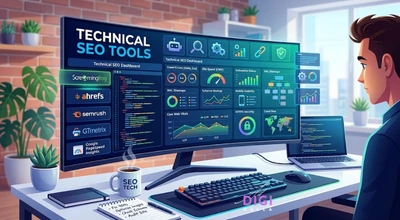
Tools for Technical SEO are :-
- Google Search Console
- Google PageSpeed Insights
- Screaming Frog
- SEMrush Site Audit
These tools help detect and fix technical issues quickly.
What We See in Indian Websites: A DigiAdGalla Audit Observation
Based on several technical SEO audits conducted in the last two years on more than 30 business sites of the Delhi NCR region (data aggregated for client confidentiality), we noticed that there is a specific problem linked with most Indian websites that is mostly ignored in generic technical SEO guides.
The most common technical SEO problem that we find when auditing Indian business websites is not the absence of meta tags or broken links. The problem lies in the failure to pass the page speed check due to incorrect optimization of images in WebP format along with non minified CSS for page builders like Elementor.
73% of the audited Indian business websites failed Google Core Web Vitals check specifically for Largest Contentful Paint (LCP), and out of those, 80% failed because of larger than 500 KB images being served without lazy loading turned on.
To solve the problem, one needs to optimize all images for WebP format, turn on lazy loading from the WordPress settings that is a single click away in Settings – Media if you use WP 5.5 and later versions and activate a caching plugin such as LiteSpeed Cache with CSS minification turned on.
These are three things that will alone make your business site hosted on shared hosting plans costing less than ₹200 per month to reduce LCP load time from 4 to 6 seconds to 2 to 3 seconds, enough for your website to pass the Core Web Vitals test.
Frequently Asked Questions
What is technical SEO?
Technical SEO refers to optimizing your website’s backend infrastructure so that search engines are able to crawl, read, and index your website properly. As opposed to on page SEO, which is focused around your content and keywords, technical SEO involves making sure that your website is crawlable, responsive, indexed, HTTPS, and navigable to search engine bots.
How does technical SEO help improve rankings?
Google can only rank websites that it has crawled and indexed. Therefore, even if you have the most amazing content, if your website cannot be crawled or indexed, Google will not see it and therefore it won’t show up in search results.
Is technical SEO hard for starters?
The fundamentals of technical SEO such as submission of sitemap, resolving 404 issues, implementing HTTPS and optimizing images can be easily done by anyone through Google Search Console and PageSpeed Insights without having to have any coding skills. The advanced level topics which include structured data implementation, JavaScript rendering and analyzing logs files need higher technical skills.
How frequently should I conduct a technical SEO audit?
For most sites, conducting a complete technical SEO audit on a quarterly basis is advisable. However, when there are major changes to the site structure, introduction of new pages and any fall in the organic traffic, immediately carrying out an audit using Google Search Console is recommended.
What are Core Web Vitals and how are they significant?
The Core Web Vitals are Google’s official metrics for user experience. Largest Contentful Paint (LCP) evaluates loading speed, Interaction to Next Paint (INP) assesses responsiveness (INP replaced the older First Input Delay metric in March 2024), and Cumulative Layout Shift (CLS) assesses visual stability. Google uses these as ranking signals, and websites that consistently meet all three tend to outperform those that don’t, especially in competitive search results. The target scores are LCP within 2.5 seconds, INP under 200 milliseconds, and CLS below 0.1.
What is the common technical SEO issue faced in India?
According to the audits of 30+ business websites of Delhi NCR region performed by DigiAdGalla (data aggregated for client confidentiality), the most common problem among Indian websites is failing to meet page speed benchmarks because of unoptimized images, specifically, images larger than 500 KB in non-WebP format on Elementor sites. Just fixing the problem by converting into WebP format, enabling lazy load through WP settings and installing LiteSpeed cache brings down LCP from 4-6 seconds to 2-3 seconds.
Conclusion
If you want your website to show up on Google, you need to know what is technical SEO.

It’s not enough to just fix your mistakes, you need to build a strong base that supports your whole SEO plan and make your website user friendly and crawler friendly.
When your website is set up correctly:
- It makes it easier for search engines to understand
- People stay longer
- Rankings keep getting better
To explore more SEO strategies, read What Is Local Search Intent? A Complete Guide to Ranking Locally on Google.