
If your team currently coordinates work through a mix of WhatsApp messages, a shared spreadsheet, and whoever remembers what was discussed in the last call, you already know exactly why this list exists.
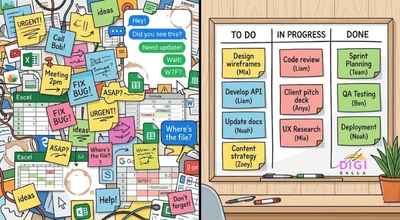
This guide compares six of the best project management software options for small teams in 2026, what each one actually costs, and which one fits which kind of team, with every specific price sourced so you know exactly where it came from.
Why This Matters Even More for a Marketing or Client-Facing Team
For a marketing team or agency specifically, project management software is not just internal tidiness, it is what keeps content calendars, campaign deadlines, and client deliverables from colliding with each other. A missed handoff between whoever writes a post and whoever schedules it is a very ordinary way for a campaign to slip, and it is exactly what this kind of tool is built to prevent.
This connects closely to a point we make in why traffic alone never grows a business, good strategy still depends on consistent execution, and consistent execution depends on a team actually knowing who is doing what by when.
What to Look For Before You Compare Any Tool
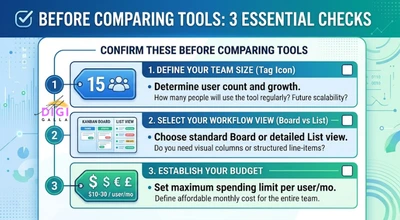
Before comparing specific tools, get clear on three things: how many people actually need seats, whether your work is better suited to visual boards, lists, or documents, and how much your budget can realistically absorb as the team grows.
It also helps to be honest about how disciplined your team actually is with new tools. The best software in the world does not help if half the team keeps working from a separate spreadsheet out of habit.
Asana: Best for Teams That Want Structure Without Overwhelm
Asana offers a free Personal plan limited to two users, with paid plans starting at Starter for $10.99 a user per month on annual billing ($13.49 monthly), moving up to Advanced at $24.99 a user per month annual ($30.49 monthly), according to pricing verified against Asana’s own official pricing page. Asana does not sell single-seat paid plans, seats are purchased starting at a minimum of two.
Asana suits teams that want real structure, timelines, dependencies, and reporting, without the steeper customization curve of a tool like ClickUp.
Trello: Best for Simple, Visual Kanban Boards
Trello’s free plan supports unlimited users with a cap of 10 boards per workspace, and paid plans start at Standard for $5 a user per month on annual billing, moving up to Premium at $10 a user per month annual, and Enterprise at $17.50 a user per month for larger organizations, according to pricing verified against Trello’s own pricing page.
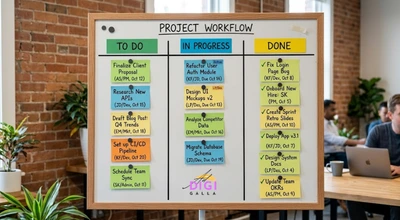
Trello remains one of the simplest, cheapest genuinely usable paid tiers on this list, and works especially well for teams that think in a straightforward Kanban flow rather than needing timelines or heavy reporting.
ClickUp: Best for Teams That Want Everything in One App
ClickUp offers a free plan with unlimited tasks and members but capped storage, and paid plans starting at $7 a user per month for the Unlimited tier on annual billing (or $10 a user per month billed monthly), moving up to $12 a user per month for Business on annual billing (or $19 a user per month billed monthly), based on pricing verified against ClickUp’s own pricing page as of August 2026. ClickUp’s AI add-on, Brain, is priced separately at roughly $9 a user per month on top of any paid plan.
What is not in dispute is ClickUp’s positioning, it tries to replace several separate tools, docs, goals, time tracking, and project views, inside one app, which appeals to small teams who want to consolidate their software stack, at the cost of a steeper setup process than a simpler tool like Trello.
monday.com Work Management: Best for Highly Visual, Customizable Boards
monday.com prices its Work Management product the same way it prices its other Work OS products, with no permanent free plan beyond a trial for 2 seats, a three-seat minimum on paid plans, and tiers starting at Basic at $9 a user per month, Standard at $12 a user per month, and Pro at $19 a user per month, all billed annually, based on pricing verified against monday.com’s own pricing page.
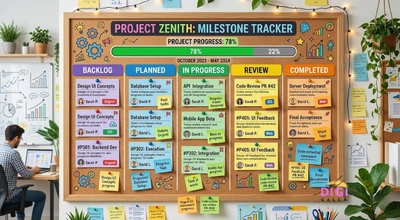
This tool suits teams that want heavy visual customization and are comfortable with the three-seat minimum, particularly teams already using other monday.com products, since the interface stays consistent across them.
Notion: Best for Teams That Want Docs and Tasks in One Place
Notion offers a genuinely usable free plan for individuals and small teams, with paid plans starting at Plus for $10 a user per month on annual billing, moving up to Business at $20 a user per month annual, which is also where Notion’s full AI features now live after the company folded its previously separate AI add-on into the Business tier, according to pricing verified against Notion’s own pricing documented by Vendr.
Notion is less a dedicated project management tool and more an all-in-one workspace that happens to handle tasks well, which makes it a strong fit for a team that already wants a shared knowledge base and documentation alongside their task tracking, rather than a separate tool for each.
Basecamp: Best Flat-Rate Option for Larger Small Teams
Basecamp offers a permanent free plan limited to one project and 1GB of storage, a Plus plan at $15 a user per month, and a Pro Unlimited plan priced as a flat $299 a month on annual billing, or $349 a month billed monthly, covering unlimited users, according to pricing verified against Basecamp’s own pricing, tracked by CostBench.
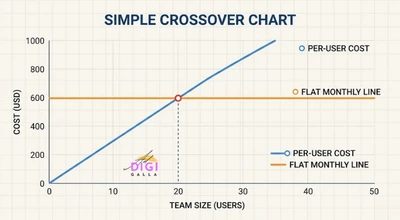
The flat-rate model is genuinely unusual in this category, and it becomes a real value pick specifically around the 20-person mark, since a per-seat tool keeps climbing in cost as a team grows, while Basecamp’s flat tier does not.
Best Project Management Software for Small Teams: A Side-by-Side Snapshot
If you are choosing quickly, the shorthand version looks like this: pick Asana if you want structure without excess complexity, Trello if you want the simplest, cheapest visual boards, ClickUp if you want one app to replace several tools and don’t mind a steeper setup, monday.com if you want heavy visual customization, Notion if you want docs and tasks together, and Basecamp if your team is approaching 20 people and flat pricing appeals to you.
None of these is objectively the best project management software for small teams in every case. The right one depends on your team’s size, budget, and how your team actually prefers to see its work laid out.
A Hypothetical Example: Choosing a Tool as a Team Outgrows Spreadsheets
To make this concrete, here is a hypothetical example based on patterns commonly seen in this kind of decision, not a real client case.
Imagine a six-person marketing team that has been tracking client deliverables in a shared spreadsheet for a year. Tasks regularly fall through the cracks between who wrote a brief and who was supposed to execute it, and the spreadsheet has grown messy enough that no one fully trusts it anymore.
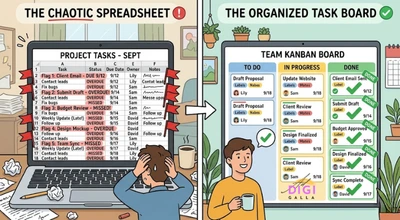
A team in this position would typically start with a free or low-cost tool, testing whether a simple Kanban board like Trello solves the immediate visibility problem before investing in a more complex platform. A team following this kind of approach would typically only move to a more feature-heavy tool like ClickUp or monday.com once they have identified a specific gap a simple board cannot solve, rather than choosing the most powerful tool available before knowing what they actually need from it. This is illustrative only, and the right starting point depends on your own team’s workflow and budget.
Common Mistakes When Choosing Project Management Software
Choosing the tool with the most features instead of the one the team will actually use. A powerful tool nobody opens consistently is worse than a simple one everyone actually updates.
Skipping a trial period with real work. Testing a tool with dummy tasks tells you very little, running one real week of actual work through it before committing reveals far more about whether it fits.
Ignoring the seat-count math. Several tools on this list have minimum seat requirements or per-user pricing that scales quickly, it is worth calculating your actual likely cost at your real team size before comparing sticker prices.
Frequently Asked Questions
- What is the best project management software for small teams in 2026?
There is no single best option for every team. Asana suits teams wanting structure, Trello suits simple visual boards, ClickUp suits teams wanting an all-in-one app, monday.com suits teams wanting heavy customization, Notion suits teams wanting docs and tasks together, and Basecamp suits teams nearing 20 people who want flat pricing.
- Is there a genuinely free project management tool for small teams?
Yes. Trello’s free plan supports unlimited users with a 10-board cap, ClickUp’s free plan supports unlimited members with limited storage, Notion’s free plan is usable for small teams, and Basecamp offers a permanent, if limited, free tier.
- How much does project management software typically cost for a small team?
Entry-level paid plans generally range from about $5 to $15 a user per month across the tools covered here, with Basecamp’s flat $299 to $349 a month plan as a notable exception once a team approaches 20 people.
- Is it worth paying for project management software if my team is very small?
Even a three or four-person team often benefits once work starts coming from more than one source, client requests, marketing campaigns, and internal tasks, since a shared system prevents work from getting lost between people or channels.
- Should a marketing team use a general project management tool or something marketing-specific?
For most small marketing teams, a general tool like the ones above is enough, since content calendars and campaign timelines map reasonably well onto standard task and board views. A dedicated marketing-specific platform usually only becomes worth it once a team is running many simultaneous campaigns with complex approval workflows.
Final Thoughts
The best project management software for small teams is rarely the one with the longest feature list. It is the one your team will actually open every day, priced in a way that scales sensibly as you grow, without forcing you to pay for complexity you do not need yet.
If you want help setting up a workflow that actually connects your project management to your marketing execution, DigiAdGalla works with businesses across Delhi NCR on the full picture from strategy through delivery. You can see our services page or get in touch to talk through what would actually fit your team.