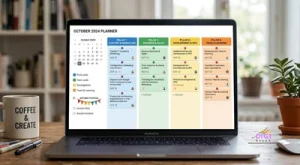
A social media content calendar is the difference between posting when you happen to have time and posting because a plan told you what to publish, where, and when. Most businesses do not fail at social media because they lack ideas. They fail because ideas arrive on a busy Tuesday afternoon, with no plan to catch them and no system to turn them into finished posts.

This guide walks through how to build a social media content calendar in eight practical steps, with a column layout you can copy, a festival layer for Indian businesses, and a sample week. The advice here reflects what a large number of planning guides from different publishers agree on, rather than a single vendor’s method.
What a Social Media Content Calendar Actually Is
A social media content calendar is a scheduled plan that shows what you will post, on which platform, and on which date, usually with the caption, the visual, and the current status of each piece sitting alongside it. At its simplest it is a spreadsheet. At its most elaborate it is a shared workspace with approval stages, deadlines, and performance notes attached to every post.
It helps to separate three things people often blur together. A content strategy decides why you post and who you are posting for. A content calendar decides what goes out and when. A scheduling tool is the software that actually publishes the posts at the times you chose. The calendar sits in the middle: it turns a strategy into a plan, and it feeds a scheduler. If you are still choosing that last piece, our comparison of social media scheduling tools covers the options and what they cost.
A calendar is also not a rigid contract. The best ones leave room to change, because a plan that cannot adapt to a real event, a customer question, or a post that suddenly takes off ends up abandoned by week three.
Why Every Business Needs a Social Media Content Calendar
The most common benefit is simply consistency. Posting on a regular rhythm is one of the few things within a small team’s control that reliably builds an audience over time, and a calendar is what makes that rhythm survive a busy fortnight. One 2026 planning guide from After Social puts the point plainly, describing consistency as the biggest predictor of social media success and a well structured calendar as the infrastructure that makes it possible.
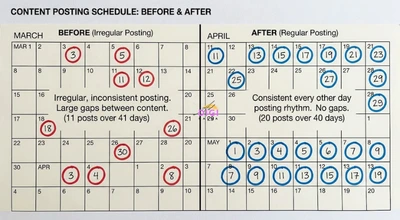
There are quieter benefits too. A calendar forces you to see your whole month at once, which makes it obvious when you are posting the same kind of content five times in a row, or when a week is entirely promotional. It lets a team divide the work, since designers, writers, and approvers can all see what is due and when. And it reduces the daily mental load of deciding what to post, which is one of the biggest time savers in the whole process, because it turns “what should I post” into “which pillar is next”.
For businesses with seasonal peaks, a calendar is closer to a necessity than a nicety. Campaigns tied to festivals need creative, offers, and approvals ready well before the date, and trying to produce all of that in the final week is how quality drops and costs rise. Our guides to Hanuman Jayanti social media post ideas and Holi marketing campaign ideas both assume you have a plan in place before the day arrives.
Strategy Before the Calendar: Four Questions to Answer First
It is tempting to open a spreadsheet and start filling in dates. After Social’s guide argues, convincingly, that this is the main reason calendars fail, because a calendar without a strategy is just a list of posts with no reason behind them. Before you open any template, answer four questions.
Who is your specific audience? Not “everyone who might buy”, but the actual type of person you want to reach, because that decides the tone, the platforms, and the topics. What single action do you want people to take? A follow, an enquiry, a visit, a purchase. Different goals call for different mixes of content. What mix of themes serves both your audience and your business? This becomes your content pillars, covered in step two. And what can your team realistically produce? A plan built for five posts a week that your team can only sustain at two will collapse, so be honest about capacity before you set a schedule.
Write the answers to these four questions at the top of your calendar. They act as a filter for every post you consider adding, and when a slot feels hard to fill, they tell you what kind of post is actually missing.
Step 1: Audit What You Have Already Posted
Before you plan new content, look at what your existing content has already told you. Several planning guides, including Xtensio’s template guide and a 2026 guide from Sked Social, begin with an audit of recent performance, and another planning guide suggests pulling the last 30 to 90 days of analytics.
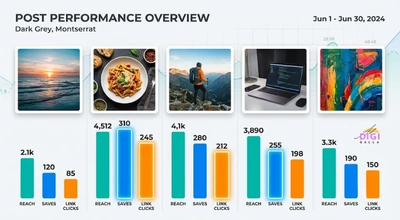
Look for patterns rather than individual winners. Which formats, topics, and posting times keep appearing among your best posts? Which types of content consistently get ignored? Pay attention to the actions that matter for your goal rather than just likes, such as saves, shares, replies, and link clicks, since a post that gets many likes but no enquiries may not be doing the job you need.
If you are starting from zero with no history, skip the audit and treat your first month as the experiment. Plan a deliberate mix, publish it, and let that month become the data you audit before planning the next one.
Step 2: Define Your Content Pillars
Content pillars are the recurring themes your brand talks about, and they are the backbone of a workable calendar. Almost every guide checked for this article lands on the same range: three to five pillars. Xtensio’s guide specifically advises avoiding more than five, since too many pillars blur your focus and make the feed feel unfocused.
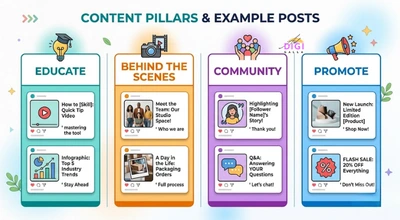
Krumzi’s guide offers a useful starting set that works for many small businesses: an educational pillar that teaches something, a behind the scenes pillar that shows the people and process, a promotional pillar that sells the product or service, and a community pillar covering customers, local events, and user generated content. Name your pillars in your own words and write a one line description of each, so that anyone helping with the calendar knows what belongs where.
To find pillars that fit your business, WebPivots’ guide suggests asking what questions your best customers ask most often and what content has performed best for you before. The overlap between those two answers is usually where a pillar lives. Once your pillars are set, every post on the calendar should map to exactly one of them. If a post does not fit any pillar, that is a useful signal that it may not belong on your feed.
A common rule of thumb for balancing them is the 80/20 rule: roughly 80 percent valuable, audience focused content and 20 percent promotional, a split described in Sked Social’s guide. Treat it as a starting point, not a law, since other guides propose different ratios. WebPivots, for example, suggests allocating a meaningful share specifically to social proof such as case studies and reviews. What matters is that you choose a ratio deliberately, rather than letting your feed drift into nonstop selling.
Step 3: Choose Your Platforms and Posting Frequency
Be selective about platforms. A calendar spread across six networks with no capacity to serve them will produce thin content everywhere. Choose the two or three platforms where your audience actually spends time, and plan formats that suit each one. Xtensio’s guide makes the related point that each pillar may perform differently on different channels, so it is worth mapping pillars to platforms rather than copying one post everywhere.
On frequency, the strongest advice in the guides checked is to start conservative and protect consistency. One planning guide recommends choosing a frequency you can sustain, using three posts a week as an example, because posting three times a week reliably beats posting daily for two weeks and then disappearing. You can always increase the cadence once the habit is established, but burning out after a fortnight of ambitious posting damages momentum more than a modest steady schedule ever would.
There is no universal “right” number of posts per platform, and published figures vary widely between sources, so this guide does not give one. Instead, set your starting frequency from your team’s real capacity, then adjust using your own analytics from step eight.
Step 4: Build Your Calendar Template
Your template is simply the set of columns each post gets. Guides from different publishers converge on a very similar list. A calendar built in Google Sheets typically includes the date, the day, the platform, the content type, the caption, a link to the visual, the hashtags, the campaign, the pillar, the status, the person responsible, and, once published, the link to the live post, a layout set out in iMark Infotech’s 2026 guide. Multilogin’s template adds a call to action and a time column to a similar list.
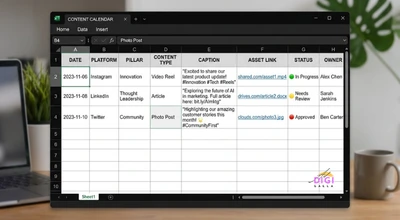
You do not need every column on day one. A good minimum is date, platform, pillar, content type, caption, visual link, and status. Add the others when you feel the gap. The status column deserves special attention, since it is what stops posts from slipping through the cracks. Use a short, consistent set of states such as idea, in production, ready for approval, scheduled, and published, so anyone opening the calendar can see at a glance what needs attention.
If you prefer a board over a spreadsheet, DigiMau’s guide suggests Trello or Notion columns that follow the content lifecycle: an idea bank, this week’s content, in production, scheduled, published, and performance review. Both layouts hold the same information, and the right one is whichever your team will actually keep updated.
Step 5: Layer in Key Dates and Festivals
Once the structure exists, mark the dates that are fixed regardless of your content plans. This is where an Indian business calendar differs most from a generic template, because festivals and national days drive some of the year’s busiest and most competitive posting periods.
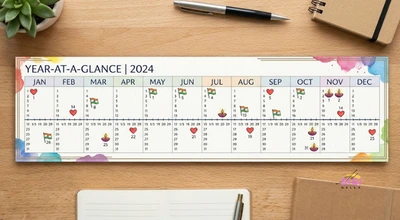
Start with the dates that do not change. Republic Day falls on 26 January, Valentine’s Day on 14 February, and Independence Day on 15 August, and the financial year begins on 1 April, which matters for accounting, finance, and B2B businesses planning around budget cycles. Then add the movable festivals, Holi, Maha Shivratri, Hanuman Jayanti, Diwali, and others, whose dates shift every year. Do not copy last year’s dates. Check an authoritative calendar each year and enter the exact dates once.
Then work backwards from each date. Xtensio’s guide recommends planning regular posts at least two to four weeks ahead, and campaigns and seasonal content two to three months ahead. That lead time is consistent with what we covered in our Diwali marketing guide, where the strongest campaigns began planning long before the festival. For each major date, decide in advance what you will say, what you will offer, and who will approve it, rather than improvising in the final days when everyone else is also posting.
Also mark your own business dates: product launches, sales, store anniversaries, exam seasons for coaching businesses, or any period when your category naturally peaks. A calendar that only reflects the national calendar misses the dates that matter most to your own customers.
Step 6: Fill the Month by Batching
With pillars, platforms, and dates in place, you can fill the month, and the efficient way to do it is in batches rather than one post at a time. Krumzi’s guide describes the order well: batch the ideas first, then the visuals, then the captions, instead of completing each post from start to finish before starting the next.
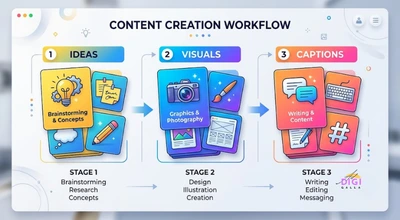
Start with a brainstorm. Sit down and list fifteen to twenty rough post ideas across your pillars in one sitting, without editing or judging them, as one guide suggests. Then slot the best ideas into the calendar by date and platform, based on your posting frequency, making sure each pillar appears at a healthy rhythm. Only after the ideas are placed do you move on to creating the assets, where doing all the photography, design, or filming for the month in one session is dramatically more efficient than doing it piecemeal.
Some guides add a larger rhythm on top. WebPivots suggests a half day quarterly session to produce the foundational content, such as longer videos, educational carousels, or case study write ups, that will feed the calendar for the following ninety days, with shorter weekly sessions handling the lighter material.
Several guides, including SocialBu’s and Later’s, also suggest leaving roughly 15 to 20 percent of slots open for reactive or trending content. Treat the exact figure as a rule of thumb, since other guides suggest anywhere from 10 to 30 percent, but the principle is sound: a calendar with no gaps leaves no room to respond to a relevant moment, and a feed made entirely of pre planned posts can feel out of touch when something timely happens.
Step 7: Schedule, Approve, and Publish
Once posts are written and the visuals are ready, move them toward publication through a clear approval step. For a solo business owner this may simply mean a final read through before scheduling. For anyone working with a team or a client, it should mean a defined stage where a named person checks tone, facts, and spelling before anything is queued. Krumzi’s guide builds client approval directly into its process, placing it before anything is scheduled, and the same principle applies inside any team.
Then queue the approved posts in a scheduler so they publish automatically at the chosen times. This is where the calendar and the scheduling tool meet: the calendar is your plan, and the scheduler is how it executes. If you already have a tool, make sure your calendar status column mirrors what is actually queued, so the two never disagree about what has gone out.
Check each platform’s specific requirements before scheduling. A post that looks right for one network may need a different image shape, caption length, or hashtag approach on another, and it is far easier to adjust this during planning than to discover a problem after a post has published.
Step 8: Review and Adjust Every Month
A calendar improves only if you use it to learn. At the start of each month, review the previous month’s performance, identify the key dates and trends in the coming month, allocate your content mix across pillars, and set a few clear goals, a monthly rhythm described in After Social’s guide.
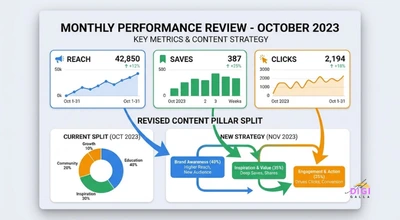
In practice, the review is a short, structured conversation with your own data. Which pillar produced the most of the actions you care about? Which one consistently underperformed? Xtensio’s guide advises replacing underperforming pillars, adjusting ratios, and updating the template accordingly, which keeps your plan responsive instead of repeating the same mix out of habit.
Record what you decide directly in the calendar, such as a note that a particular format worked well or that a certain posting time did not, so the knowledge accumulates rather than living only in someone’s memory. After three or four months, those notes become the most valuable part of the document.
Which Tool Should Hold Your Calendar
The tool matters less than the habit of using it, and almost any of the common options can work. Guides checked for this article list Google Sheets and Excel for simple setups, project tools such as Asana, Trello, Notion, and Airtable for teams that want workflow stages, and dedicated social platforms for those who want planning and publishing in one place.
A spreadsheet is the easiest place to begin. It is free, familiar, easy to share, and flexible enough to hold every column covered above. A board tool like Trello or Notion suits teams who think in stages and want to drag a post from idea to published. A dedicated social tool makes sense once you are publishing across several platforms and want the plan and the publishing in the same place. Our project management software comparison covers Notion, Trello, and Asana in more detail, and our scheduler comparison covers the tools that publish your posts.
A sensible path for most small businesses is to start in a spreadsheet, move to a board tool when the team grows or the workflow gets complicated, and add a scheduler when publishing by hand starts to cost real time. Moving up before you actually feel the limit of the simpler tool usually just adds cost and complexity without adding results.
A Sample Week: What a Filled Calendar Looks Like
To make this concrete, here is a hypothetical example of one week of a social media content calendar for a small neighborhood bakery. This is an illustration of the structure, not a real client plan, and the right mix for your business depends on your own audience and pillars.
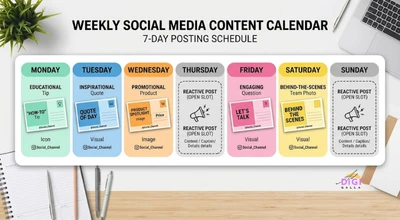
Imagine the bakery uses four pillars: educational, behind the scenes, community, and promotional. On Monday it posts a short educational carousel explaining how to store sourdough so it stays fresh, tagged to the educational pillar. On Wednesday it shares a behind the scenes video of the early morning bake, tagged to the behind the scenes pillar. On Thursday it reposts a customer’s photo of a birthday cake with permission and credit, tagged to the community pillar. On Friday it publishes a promotional post for the weekend’s special loaf with a clear ordering call to action. On Saturday it posts a story based poll asking followers to vote on next week’s flavor, which doubles as a community and engagement post.
Tuesday and Sunday are left open on purpose, so the team can respond to a local event, a customer question, or a relevant moment without disrupting the plan. Across the week, only one of five planned posts is promotional, which is roughly in line with the 80/20 rule of thumb, and every post maps to a single pillar. A business following this structure would typically repeat the pattern each week while rotating specific topics, then review results monthly and adjust the pillar mix based on what its own audience responded to.
Using AI Without Making Your Calendar Generic
AI tools can speed up planning, and several 2026 guides now include AI assisted steps. Multilogin’s guide, for instance, offers prompts for brainstorming pillars and generating post ideas from a brand description. Used well, AI is genuinely useful for the early, messy stage of planning: producing a long list of rough ideas to react to, suggesting alternative angles on a topic, or drafting a first caption you then rewrite.
The risk is sameness. If every business in your category asks an AI for post ideas with a generic prompt, many of them will publish near identical content. The way around this is to feed the tool specifics only you have, such as your actual customer questions, your own stories, local details, and your own tone, and to treat its output as raw material rather than finished copy.
Keep a human in charge of the final result. Check facts, remove anything that sounds like it could belong to any brand, and make sure every post still maps to a pillar and still sounds like you. Consistency of voice is part of what an audience comes to recognize, and it is the one thing a generic prompt cannot supply for you.
Common Social Media Content Calendar Mistakes
Building the calendar before the strategy. As covered earlier, a calendar with no clear audience, goal, or pillars is only a list of posts, and it tends to be abandoned once the initial enthusiasm fades.
Creating too many pillars. Almost every guide checked recommends three to five, and Xtensio explicitly advises against more than five. Beyond that, the feed loses focus and the calendar becomes harder to maintain.
Overcommitting on frequency. Planning more posts than your team can realistically produce is the fastest route to a calendar that collapses. Start with a steady, sustainable schedule and increase it only once the habit holds.
Leaving no room for reactive content. A calendar with every slot pre filled cannot respond to a timely moment. Reserve a few open slots each week for that purpose.
Skipping the monthly review. Without a regular look at what worked, the calendar repeats the same mix forever, and the data you generated each month never turns into better decisions.
Copying last year’s festival dates. Movable festivals shift every year, so enter the correct dates fresh from an authoritative calendar rather than assuming last year’s dates still apply.
Letting the calendar and the scheduler disagree. If your calendar says a post is scheduled but the tool has nothing queued, or the reverse, something will eventually be missed or posted twice. Keep the status column honest.
Frequently Asked Questions
- What is a social media content calendar?
A social media content calendar is a scheduled plan showing what you will post, on which platform, and on which date, usually alongside the caption, the visual, and the status of each post. It can be as simple as a spreadsheet or as detailed as a shared workspace with approval stages.
- How do I create a social media content calendar from scratch?
Start with your audience and goal, audit your recent posts if you have any, define three to five content pillars, choose two or three platforms and a sustainable posting frequency, set up a template with columns such as date, platform, pillar, caption, and status, mark key dates and festivals, then batch create the content and review the results each month.
- How many content pillars should I have?
Almost every planning guide checked for this article recommends three to five. Xtensio’s guide advises avoiding more than five, because too many pillars blur your focus and make the feed harder to keep consistent.
- How far in advance should I plan social media content?
Xtensio’s guide recommends planning regular posts at least two to four weeks ahead, and campaigns or seasonal content two to three months ahead. For festival campaigns, working backwards from the date and starting early is what separates a polished campaign from a rushed one.
- What should a social media content calendar template include?
A practical template includes the date, platform, content type, content pillar, caption, a link to the visual, the status, and the person responsible. Many also add hashtags, the campaign name, a call to action, and the published link once the post is live. You can start with a short list and add columns as you need them.
- What is the best tool for a social media content calendar?
The best tool is the one your team will keep updated. Google Sheets or Excel work well for simple setups, Trello, Notion, Asana, or Airtable suit teams that want workflow stages, and dedicated social platforms combine planning and publishing. Most small businesses do well starting in a spreadsheet and upgrading only when they feel its limits.
- How often should I post on social media?
There is no single right number, and published recommendations vary widely. A safer approach is to choose a frequency your team can sustain, such as three posts a week as one guide suggests, build the habit first, and increase it only once you can maintain it comfortably.
- How do I keep a content calendar from falling apart?
Keep the plan realistic, use a clear status column so nothing slips, batch your content creation instead of making one post at a time, leave a few open slots for reactive posts, and review the calendar each month. Most calendars fail because they were overambitious or never reviewed, not because the idea itself does not work.
Final Thoughts
A social media content calendar works when it is simple enough to keep using and tied to a strategy that explains why each post exists. Start with your audience and goal, choose three to five pillars, pick a sustainable frequency, and build a template you will actually open. Layer in the festivals and business dates that matter to your customers, batch your creation, and review what the data says every month.
If you would rather have an expert team plan and run this for you, DigiAdGalla works with businesses across Delhi NCR on content planning, creative, and paid reach. You can see our social media marketing services, read more about how social content fits into the wider marketing funnel, explore our guide to influencer marketing, or get in touch to talk through your own calendar.