
Social media scheduling tools exist for one simple reason: posting consistently is hard to do by hand, and the businesses that manage it best are rarely the ones typing each post live at the moment it goes out. If your social accounts currently depend on someone remembering to post between other tasks, a scheduler is usually the single cheapest upgrade available to your marketing.

This guide compares seven of the best social media scheduling tools in 2026, explains why their pricing is harder to compare than it looks, and flags honestly where independent sources disagreed on a number, so you know what to double check before paying for anything.
What Social Media Scheduling Tools Actually Do
At their core, social media scheduling tools let you write, queue, and automatically publish posts across several platforms from one place, instead of logging into each app separately at the moment you want something to go live. Most also include a content calendar so you can see your whole month at a glance, a basic analytics view showing how individual posts performed, and increasingly an AI assistant that helps draft captions or repurpose a post for a different platform.
What they do not do is replace the strategy behind the posting. A scheduler will publish a weak post at exactly the time you chose just as reliably as a strong one, and no tool can tell you what your audience actually wants to see. Think of this category as infrastructure for consistency, the thing that removes the friction of showing up, rather than a shortcut to engagement. If you want the strategy side first, our social media marketing guide covers how to decide what to post before you decide how to schedule it.
Why Scheduling Matters for Small Businesses
Consistency is the main reason small businesses adopt a scheduler, and it solves a very ordinary problem: social media posting tends to be the first task that slips when a week gets busy. A queue built in one focused session means the accounts keep publishing even during the weeks when nobody has time to think about social at all.
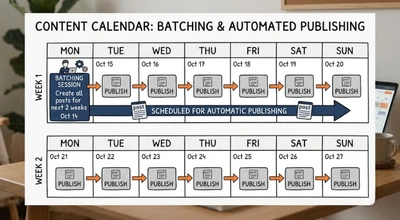
Scheduling also makes planned, date sensitive campaigns far easier to run well. Festival and occasion content is the clearest example, since you know the dates months in advance and the posts need to be ready before the busiest, most crowded days of the year. Our Diwali marketing guide is built around planning content weeks ahead, and our Independence Day marketing guide recommends scheduling posts at least a day or two before the date rather than posting on the day itself, which is exactly the workflow a scheduler is built for.
There is also a quieter benefit worth naming. When posts are prepared in advance, you have time to review them properly, check the wording, and catch a mistake before it goes public, which is a meaningfully better position than writing under time pressure and hitting publish immediately.
How Social Media Scheduling Tools Price Themselves
This is the single most useful thing to understand before comparing prices, because the headline number on a pricing page is not comparable across tools. Social media scheduling tools charge in fundamentally different ways, and the model that is cheapest for one business can be the most expensive for another.
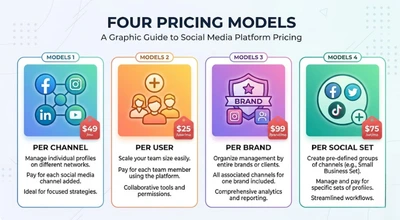
Buffer charges per connected channel, not per person. Hootsuite charges per user, so every additional team member adds to the bill. Metricool bills by brand rather than by seat, a model SureThing’s roundup notes is a large part of why agencies like it. Later bundles profiles into a social set, one profile per platform, and its price climbs as you add sets and seats.
The practical way to cut through this is to run the arithmetic for your own situation rather than comparing starting prices. Using figures covered later in this guide, five channels on Buffer’s Essentials plan on annual billing comes to $25 a month, according to CompareCrest’s Buffer breakdown. A three person team on Hootsuite’s Standard plan comes to $297 a month, according to PostDaily’s Hootsuite pricing analysis. Neither number tells you which tool is better, only that a solo operator with five accounts and a three person team with ten accounts are shopping in completely different price ranges, and that the sticker price on the first page of each site is not the number you will actually pay.
For context on how wide the overall range is, Later’s own comparison of scheduling tools describes the market as running from free options through $5 to $50 a month for individuals and small teams, up to $199 to $399 or more per seat per month for enterprise platforms. Since that comparison comes from a vendor with its own product in the list, treat it as a rough map of the range rather than a neutral benchmark.
What to Check Before You Compare Any Tool
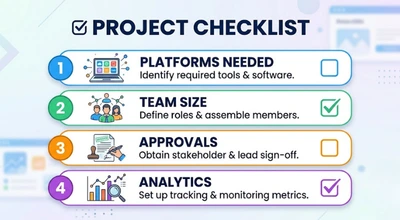
Before comparing specific tools, get clear on a short list of things that actually decide which one fits. First, which platforms you genuinely need, since support varies, and a tool that is excellent for Instagram may be weaker for LinkedIn or X. Second, how many people need access, and whether any of them need approval workflows, where a manager reviews posts before they go live. Third, whether analytics matter to you enough to want them inside the same tool, or whether you are happy checking each platform’s native analytics separately.
Before committing to any tool, run a real week of your own content through its free plan or trial rather than a dummy post. Some platform specific formats, such as interactive stickers or trending audio on short form video, may not be available through every third party scheduler, so it is worth testing one post of each type you actually publish before you move your whole workflow into a tool and discover a gap later.
It is also worth checking Google Business Profile support if you run a local business, since not every scheduler publishes there. According to Eclincher’s comparison of schedulers, many scheduling tools, including Hootsuite and Buffer, support Google Business Profile posting, which matters because keeping a profile active is part of local visibility.
Buffer: Best for Simple, Affordable Scheduling
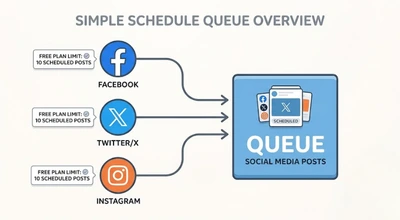
Buffer has a permanent free plan covering three channels with up to ten scheduled posts per channel, according to CheckThat.ai’s Buffer pricing breakdown. Paid plans are priced per channel: Essentials costs $6 per channel per month or $5 on annual billing, and Team costs $12 per channel per month or $10 on annual billing, with Team adding unlimited team members and approval workflows. Buffer also applies lower per channel rates once you pass ten channels, so larger accounts should use its calculator rather than multiplying the starting price.
Buffer’s own comparison page states the same entry numbers, describing the tool as starting free and costing $5 per channel per month on paid plans, in Buffer’s Buffer vs Hootsuite comparison. As it is Buffer describing its own pricing, the figures are reliable, though its framing of who should choose which tool is naturally favorable to Buffer.
Buffer is the one to look at first if your needs are straightforward: a handful of accounts, one or two people, and a clean interface that does not require a learning curve. The trade off to understand is the per channel model. Because every connected account adds to the bill, the cost climbs steadily as you add channels, and a team managing many client accounts can find the total less attractive than a per brand tool. It is also worth knowing that Zapier’s roundup notes Buffer has a history of changing its pricing and features quite drastically, so confirm current numbers rather than trusting any single article, including this one.
Later: Best for Visual, Instagram First Brands
Later is built around visual planning, with a media first approach where you start from your images and videos and build posts around them, and a grid preview that shows how your Instagram profile will look before you publish. According to Later’s own pricing comparison, its Starter plan begins at $18.75 a month billed annually, and Eclincher’s independent comparison lists the same entry plan at $25 a month on monthly billing, which is consistent with a standard annual discount.
Pricing above the Starter tier is where older articles disagree, because Later has restructured its plans. Current sources show three tiers: Starter at $25 a month ($18.75 on annual billing), Growth at $50 ($37.50 annually), and Scale at $110 ($82.50 annually). Some older comparisons still list a plan called Advanced or a Growth price near $45, which no longer matches that grid, so confirm the current tiers on Later’s pricing page before budgeting.
Free access is another point where sources differ. Most current sources say Later no longer has a permanent free plan and offers a 14 day free trial instead, though a few still mention a limited free plan, so check what is currently offered rather than assuming either. Later suits brands whose growth lives mainly on Instagram and Pinterest, where seeing the grid in advance genuinely changes how you plan. For a brand that publishes mostly text led posts on LinkedIn or X, its core strength matters less and a simpler tool may serve you better.
Hootsuite: Best for Larger Teams
Hootsuite is one of the longest established names in this category and is built for teams rather than individuals. Nearly every source checked for this guide agrees on the entry price: the Standard plan costs $99 per user per month on annual billing and connects up to 10 social accounts, with no free plan, according to PostDaily’s analysis, which read the figures from Hootsuite’s own plans page. Hootsuite also lists a discounted rate for nonprofits on some plans, so ask about it if that applies to you.
Above the entry tier, sources disagree. Hootsuite’s own pricing page shows Standard at $99, Professional at $199, and Advanced at $399 per user per month on annual billing, with approval workflows on the Advanced tier and a 14 day free trial. Slightly older sources, including Turrboo’s pricing guide, list Advanced at $249, and sources also disagree on whether the free trial runs 14 or 30 days. Hootsuite has clearly restructured its plans more than once, so verify the current tier names and prices on its own page before budgeting.
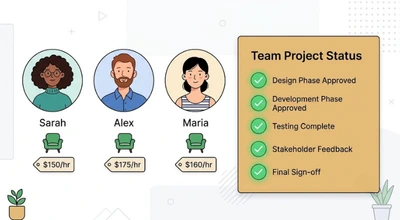
The per user model is the key thing to weigh. Three people on Standard cost $297 a month, and if all three need approvals, the Advanced tier pushes that figure far higher. Hootsuite earns that cost for large marketing teams that genuinely need social listening, a unified inbox, and approval routing in one platform. For a solo operator or a very small team, it is usually more tool, and more money, than the job requires, which is why simpler per channel or per brand tools tend to fit smaller businesses better.
Metricool: Best for Analytics Plus Scheduling
Metricool combines scheduling with unusually broad analytics in one dashboard. According to SureThing’s roundup, it folds organic scheduling, paid ad tracking across Meta, Google, and TikTok, and competitor analysis into one place, and Zapier names it the best pick in its own comparison for social media analytics and reporting.
Metricool has a free plan covering one brand, currently limited to 20 posts a month according to its pricing page, so older articles may report different figures. The free plan also cannot connect LinkedIn or X, so a business that needs either has to move to a paid plan. Metricool’s own pricing page shows its Starter plan at about $20 a month on annual billing or $25 monthly (or €16 and €20 in euros), excluding VAT, while other sources report slightly different figures. Check the live pricing page for your region.
Metricool suits freelancers, agencies, and small teams that want reporting without buying a separate analytics tool. Because it bills by brand rather than by seat, adding a teammate does not automatically raise the price the way it does on a per user tool, which can make it noticeably cheaper for a small agency than a platform like Hootsuite.
Meta Business Suite: Best Free Option for Facebook and Instagram
If your presence is mainly on Facebook and Instagram, Meta’s own Business Suite offers scheduling for both at no cost, and Later’s comparison lists it among the genuinely free options in this category. For a small local business that only needs to queue posts and stories on those two platforms, this can cover the whole requirement without paying for anything.
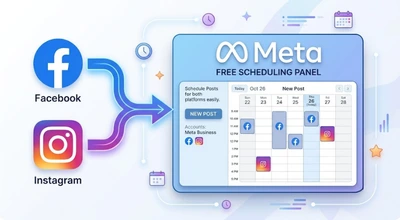
The limitation is scope. It covers Meta’s own platforms, so the moment you also want to publish on LinkedIn, X, or TikTok, you need a separate tool or a third party scheduler. For many small businesses that is a fine boundary, and starting here before paying for anything is a sensible way to find out whether scheduling actually fits your workflow.
Publer and Sprout Social: Two More Worth Knowing
Two more names appear repeatedly across independent comparisons and are worth knowing about, even though pricing for both was inconsistent enough across sources that no figure is stated here. Publer is frequently listed as a budget friendly, like for like alternative to Buffer, and SureThing’s roundup calls it the best budget pick. Sprout Social is positioned for larger teams that want deeper analytics and listening, and appears in comparisons alongside Hootsuite as a premium option.
Sources reported Sprout Social’s per seat pricing at figures ranging from under $100 to several hundred dollars a month depending on plan and source, a spread too wide to state a reliable number. If either tool looks like a fit, get a current quote directly from the vendor rather than relying on a third party figure.
Social Media Scheduling Tools: A Side by Side Snapshot
If you are choosing quickly, the shorthand version looks like this. Pick Buffer if you want the simplest, most affordable scheduling for a few accounts. Pick Later if your brand is visual and Instagram led. Pick Hootsuite if you run a larger team that needs listening and approval workflows and can justify the per seat cost. Pick Metricool if you want analytics and scheduling together and may manage several brands. Pick Meta Business Suite if you only need Facebook and Instagram and want to pay nothing.
None of these social media scheduling tools is objectively the best in every case, and given how differently they charge, the right choice depends mostly on how many accounts and how many people your setup involves. Work out your own numbers for channels, users, and brands before comparing, then confirm the current price directly with the vendor.
How to Actually Use a Scheduler Well
Owning a scheduler and using it well are different things, and most of the value comes from the habits around the tool rather than the tool itself. The most effective workflow for most small businesses is batching: set aside one regular block of time each week or fortnight to write and queue posts together, rather than treating scheduling as a daily chore.
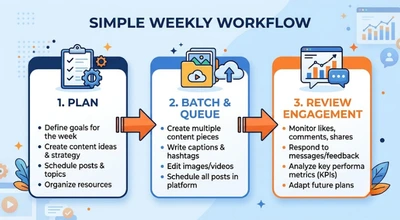
Leave deliberate room for the unscheduled. A feed made entirely of queued posts can feel flat and tone deaf if something relevant happens that day, so keep capacity to post live when a news moment, a customer comment, or a local event makes a timely post worth more than a prepared one. Replying to comments and messages promptly is also something a scheduler does not do for you, so build that into your routine separately.
Review what the analytics say on a regular cadence, and let the results change what you queue next, since a scheduler gives you data on timing and format that is only useful if you act on it. If you are connecting social posting to wider lead generation, our guide to the digital marketing funnel explains where social content sits in the path from stranger to customer.
A Hypothetical Example: A Small Business Choosing a Scheduler
To make this concrete, here is a hypothetical example based on patterns commonly seen in this kind of decision, not a real client case.
Imagine a small café with accounts on Instagram, Facebook, and a Google Business Profile, run by the owner and one part time team member. The owner currently posts whenever there is a spare moment, which in practice means irregularly, and often not at all during the busiest weeks. A business in this position would typically start with the free tools first, Meta Business Suite for Facebook and Instagram, or Buffer’s free plan for up to three channels, to find out whether a regular posting rhythm actually improves anything before spending money.
A team following this kind of approach would typically move to a paid plan only once a specific limit started to bite, such as needing more than ten queued posts per channel, wanting a second login, or wanting analytics in one place. At that point, the per channel arithmetic on a tool like Buffer would be the first thing worth working out, since a small business with three or four accounts is exactly where per channel pricing tends to be cheapest. This is illustrative only, and the right tool depends on your own platforms, team size, and budget.
Common Mistakes With Social Media Scheduling Tools
Comparing starting prices instead of running the numbers for your own setup. As covered earlier, per channel, per user, per brand, and per social set pricing models can make the same business cost very different amounts depending on how many accounts and people are involved.
Scheduling everything and then disengaging. A scheduler handles publishing, not conversation. Accounts that queue posts but never reply to comments or messages tend to feel automated and unresponsive, which undercuts the consistency the tool was meant to create.
Posting identical content on every platform. Each platform has its own norms for format, tone, and length, so a post copied unchanged from one network to another often underperforms. Most tools let you customize a post per platform, and it is worth using that.
Trusting a single pricing article as final. Several tools in this guide have restructured their plans in the past year, and sources disagreed on specific numbers for Hootsuite, Later, and Metricool, so a quick check on the vendor’s own page before paying is always worth the few minutes.
Skipping a trial with real content. A tool can look perfect in a feature list and still handle your specific formats awkwardly, which is far cheaper to discover during a free week than after paying for a year.
Choosing a heavyweight team platform for a solo operation. Paying per seat for features like approval routing and social listening that you will never use is one of the most common ways small businesses overspend in this category.
Frequently Asked Questions
- What are the best social media scheduling tools in 2026?
There is no single best option for every business. Buffer suits simple, affordable scheduling for a few accounts, Later suits visual and Instagram led brands, Hootsuite suits larger teams, Metricool suits teams wanting analytics alongside scheduling, and Meta Business Suite suits businesses that only need Facebook and Instagram and want a free option.
- Is there a free social media scheduling tool?
Yes. Buffer has a permanent free plan for up to three channels with up to ten scheduled posts per channel, Meta Business Suite is free for Facebook and Instagram, and Metricool offers a free plan for one brand with a limited monthly post allowance. Hootsuite does not offer a free plan.
- How much do social media scheduling tools cost?
Costs range from free to a few dollars per channel per month for simple tools, up to $99 or more per user per month for team platforms like Hootsuite, with enterprise tools costing more. Because tools charge per channel, per user, per brand, or per social set, the real cost depends on how many accounts and people you have.
- Is Buffer cheaper than Hootsuite?
For most small setups, yes. Buffer’s paid plans start at $5 per channel per month on annual billing, while Hootsuite starts at $99 per user per month. A solo operator with five channels pays about $25 a month on Buffer’s Essentials plan, while a three person Hootsuite Standard team pays $297 a month.
- Can I schedule posts to Google Business Profile?
Many scheduling tools support Google Business Profile posting, according to Eclincher’s comparison, which names Hootsuite and Buffer among them. Support varies by tool and plan, so confirm that your chosen scheduler publishes there before subscribing if local visibility matters to you.
- Do I need a scheduling tool if I only post a few times a week?
Not necessarily. If you post infrequently and only on Facebook and Instagram, Meta Business Suite’s free scheduling may be all you need. A paid scheduler becomes more worthwhile as you add platforms, team members, or a regular posting cadence that is hard to maintain by hand.
- Which scheduling tool is best for agencies?
Per brand pricing tools like Metricool tend to suit small agencies, since adding a teammate does not automatically raise the price. Larger agencies needing approval workflows and client reporting often look at Team tier or Hootsuite style platforms, though per seat costs rise quickly, so it is worth working out the numbers for your actual client and team count.
- Why do review articles show different prices for the same scheduling tool?
Several tools have restructured their plans recently, some price in different currencies, and annual and monthly billing give different figures. Hootsuite’s higher tiers and Metricool’s entry price were both reported inconsistently across the sources checked for this guide, which is why a quick check on the vendor’s own pricing page is worth doing before you commit.
Final Thoughts
Social media scheduling tools are one of the most practical, least glamorous upgrades a small business can make, because they remove the friction between knowing you should post consistently and actually doing it. The right one is rarely the most feature rich. It is the one whose pricing model matches how many accounts and people you actually have, with a total cost you have worked out for your own setup rather than inferred from a starting price.
If you want help turning a posting calendar into a social strategy that actually brings in customers, DigiAdGalla works with businesses across Delhi NCR on the full picture, from content planning through paid reach. You can see our social media marketing services, read about how influencer marketing can extend your reach, or get in touch to talk through what your accounts actually need.