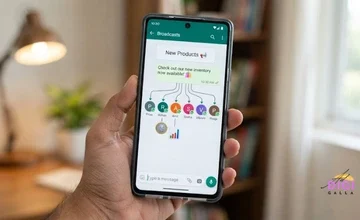
The best email marketing tools are not the ones with the longest feature list. They are the ones whose price, limits and strengths match the size of your list and the kind of emails you actually send. A tool that suits a creator with a weekly newsletter can be a poor, expensive fit for an online store, and the reverse is just as true.
That is why this guide is organised by use case. You will see what each tool costs according to named sources, where those sources disagree, and who each tool actually suits.
You will also learn how email platforms price themselves, why your sending domain matters more in 2026 than it used to, and how to switch tools without hurting your emails.
Prices and free plan limits were last checked on 19 November 2026.

What Email Marketing Tools Actually Do
Email marketing software lets you collect subscribers, send campaigns to them, and automate messages that trigger from what a person does, such as joining a list or buying something. Most platforms also include a drag-and-drop email editor, signup forms, basic reports and a place to store your contacts.
What these tools do not do is write your strategy or fix a weak offer. A platform will deliver a dull email just as reliably as a good one. Treat the tool as the engine and your list, offer and message as the fuel.
It also helps to separate three jobs that people often blur together. Newsletters are regular one-to-many emails. Automations are emails sent in response to behaviour, like a welcome series. Transactional emails, such as order receipts, are usually handled by your store or app. Most tools in this guide cover the first two, so check how each one handles the third if you need it.
If you want the strategy side, our guide to email marketing for ecommerce covers the core flows, and our post on the digital marketing funnel shows where email sits in the wider journey.
How Email Marketing Tools Price Themselves
This is the most useful thing to understand before comparing prices, because the headline “starts at” number says very little about what you will pay once your list grows.
Most email platforms price in one of two ways. Some charge by the number of contacts you store, which means the bill climbs as your list grows. Others charge by how many emails you send, which can be cheaper if you have a large list but email it rarely.
The size of the climb can be dramatic. According to Kanal’s Klaviyo pricing guide, which cites Klaviyo’s pricing page as of 24 October 2026, Klaviyo’s Email plan costs $20 a month at 500 active profiles, $150 a month at 10,000 and $720 a month at 50,000. ActiveCampaign follows a similar pattern. At 1,000 contacts on annual billing its Starter plan is $15 a month, while at 10,000 contacts Starter is about $149 a month on annual billing, according to AI Tools Directory’s 2026 review.

Two practical points follow from this. First, always price a tool at the list size you expect in a year, not the list size you have today. Second, check whether the tool counts inactive or unsubscribed contacts toward your bill, since some do and some do not. Cleaning your list regularly can lower your costs on any contact-based plan.
Free plans deserve the same caution. Several well-known tools have cut their free allowances in recent years, so the free plan you read about in an older article may no longer exist in that form.
What to Check Before You Compare Any Tool
Before you compare specific platforms, get clear on a short list of questions.
How big is your list now, and how big will it be in a year? This decides which pricing model suits you. How often will you send? A weekly newsletter and a daily promotional schedule need very different limits. Do you need automation, such as welcome series, abandoned cart emails or tagging based on behaviour, or only simple broadcasts?
Where do you sell? An online store benefits from tools that connect to your store and read purchase data. A creator selling a course needs landing pages and paid-product features. A service business may care most about its CRM.
Finally, check practical details that rarely make the headline comparison: whether you can authenticate your own sending domain, how easy it is to export your list, what support looks like, and whether the pricing is shown in your local currency. If you are in India, it is worth checking the regional pricing page rather than assuming a US dollar figure applies directly.
Automation or Broadcasts: How Much Do You Actually Need?
Many people pay for automation they never build. Before you compare plans, decide which emails you genuinely want to send on autopilot. For most small businesses the list is short: a welcome series for new subscribers, and perhaps a follow-up for people who have gone quiet. Online stores usually add an abandoned cart email and a post-purchase message.
Write those flows down on paper first. Then check that each tool’s plan can actually build them, not just that the feature appears on a comparison page. Entry plans sometimes limit how long or how branched an automation can be, and ActiveCampaign’s Starter plan is one example that sources flag, as covered below.
If all you plan to send is a monthly newsletter, a simple tool with basic automation will serve you well, and you can move to a heavier platform later if your needs grow. Starting with an advanced platform you barely use is a common way to overspend.
Deliverability in 2026: Why Your Sending Domain Matters
A great email that lands in spam is worth nothing, and the rules around authentication have tightened. Google’s Email sender guidelines say that all senders to Gmail should set up SPF or DKIM authentication and keep spam rates reported in Postmaster Tools below 0.3%. Google also recommends staying under 0.10%.
Bulk senders face stricter rules. If you send more than 5,000 messages a day to personal Gmail accounts, Google requires SPF, DKIM and DMARC, with the From domain aligned to your SPF or DKIM domain, and requires marketing messages to support one-click unsubscribe. A DMARC policy of “none” is enough to meet the requirement.
Most small businesses send far below that volume, but the habits are worth adopting anyway. They protect you as you grow, and the same setup helps your emails reach inboxes at any volume.
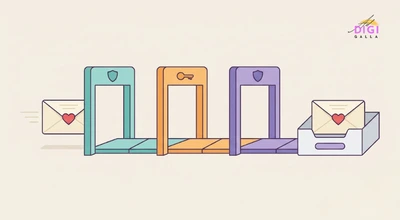
In practice, this means choosing a tool that lets you verify your own domain, following its setup steps for SPF and DKIM, and watching your unsubscribe and complaint rates. Make unsubscribing easy rather than hidden. A person who cannot unsubscribe quickly is more likely to hit the spam button, which hurts every email you send afterwards.
Mailchimp: The Familiar All-Rounder
Mailchimp is the name most people know, with a wide template library and a large range of integrations. According to Geekflare’s 2026 comparison, its free plan covers 250 contacts and 500 sends a month, and the Essentials plan starts at about $13 a month at 500 contacts. Other recent comparisons, including Forbes Advisor’s, place paid plans in a similar range.
The free tier has shrunk over time, which is worth knowing if you read older guides that describe a more generous plan. Mailchimp suits small businesses that want a familiar, well-supported tool and do not need advanced automation. The trade-off is cost as your list grows, since paid plans scale with contacts. For a closer small-business view, see our guide to email marketing tools for small business.
Brevo: Best When You Send by Volume, Not List Size
Brevo, which used to be called Sendinblue, prices mainly by the number of emails you send rather than the size of your list. Several 2026 comparisons, including Geekflare’s and Mailsoftly’s, report a free plan with 300 emails a day and paid plans starting at about $9 a month for up to 5,000 emails.
Sources differ on how many contacts the free plan allows. Brevo’s own comparison says up to 100,000 contacts, while other sources describe it as unlimited, so treat the exact cap as something to confirm. Because that comparison is written by Brevo, it is worth weighing with that in mind.
Brevo works well for a business with a large list that emails occasionally, since you are charged for what you send, not who you store. It also offers SMS and WhatsApp messaging alongside email. The trade-off is that the daily send cap on the free plan can slow a large campaign down.
MailerLite: Best for Simple, Clean Newsletters
MailerLite is known for a simple editor and a gentle learning curve, which makes it popular with bloggers, small shops and solo operators. Its free plan has been changed several times, and that shows in the sources. Newer comparisons, including Geekflare’s and Sequenzy’s, list a free plan of about 250 subscribers and 2,500 emails a month. Some older guides list much higher limits, such as 1,000 subscribers.
Paid plans are reported from about $12 a month in those newer comparisons, though older articles show lower figures. Because the free allowance and entry price have both moved, confirm the current numbers on MailerLite’s own pricing page before relying on any article, including this one.
MailerLite suits a sender who wants a clean tool with decent automation for a modest list. The trade-off is that its free plan is now small, so it is better seen as a low-cost paid tool than a long-term free one.
Klaviyo: Best for Online Stores
Klaviyo is built around ecommerce. It connects to online store platforms, reads purchase behaviour and lets you trigger emails from what shoppers do, such as browsing, abandoning a cart or buying.
According to Kanal’s guide, citing Klaviyo’s pricing page as of 24 October 2026, the free plan covers 250 active profiles and 500 email sends a month, and the Email plan starts at $20 a month at 500 active profiles. Klaviyo also sells higher plans that bundle more channels, so check its pricing page for what each one includes. Pricing is based on active profiles, so the cost climbs as your audience grows, as shown earlier.
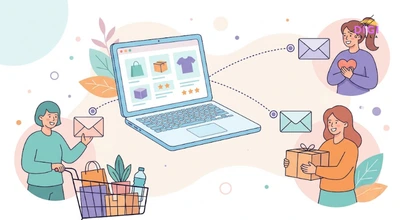
Klaviyo is the strongest fit for a store that wants behaviour-based flows. The trade-off is price. For a store with a very small list or a limited budget, a lighter tool can be easier to afford. Our guide to email marketing for ecommerce explains the flows worth building first.
ActiveCampaign: Best for Deep Automation
ActiveCampaign is built for automation, with flows that branch based on what people click, buy or ignore. It has no free plan, and sources report a 14-day free trial instead.
At 1,000 contacts on annual billing, the plans are Starter at $15 a month, Plus at $49, Pro at $79 and Enterprise at $145, with higher prices on monthly billing, according to Mailsoftly’s ActiveCampaign pricing guide and AI Tools Directory. At 10,000 contacts on annual billing, the same sources put Starter near $149 and Plus near $189.
One point to check before buying is how much the entry plan actually lets you automate. Superdupr’s pricing analysis notes that the Starter plan caps the length of automations, so a business that wants serious multi-step flows may need to budget for a higher tier than the headline price suggests. ActiveCampaign suits businesses that plan to build real automation. For a simple monthly newsletter, it is more tool than you need.
HubSpot: Best When Email and CRM Live Together
HubSpot’s strength is that email sits inside a customer relationship tool, so every email and reply connects to a contact record. HubSpot’s free tools include email marketing, but the allowance has been changing. Several comparisons, including Geekflare’s and Mailsoftly’s, report up to 2,000 sends a month, while PricingSaaS, which tracks pricing pages, reported on 23 October 2026 that the free plan’s email allowance had dropped from 2,000 to 300 sends a month. Confirm the exact limit on HubSpot’s own pricing page.
Paid pricing needs care. Sources put the Marketing Hub Starter plan at roughly $15 to $20 a month, depending on the source and the setup, and Geekflare notes a very large step up to the Professional tier, in the region of several hundred dollars a month. The same tracker also noted that a Starter-tier email limit moved to shared HubSpot credits, so check the current structure before you plan around a paid upgrade.
HubSpot suits businesses that want email and a CRM in one place, particularly if sales and marketing share the same contacts. If you are still choosing the CRM side, our guide to the best CRM for small business compares the options. The trade-off is that the jump from the cheap entry tier to full marketing automation can be steep.
Kit: Best for Creators and Newsletters
Kit, formerly known as ConvertKit, is built for creators who sell courses, digital products or paid newsletters, with landing pages and subscriber tagging at its core. Several comparisons, including Geekflare’s and meetergo’s, report a free plan for up to 10,000 subscribers, which is unusually generous.
Paid pricing is where sources disagree. A review dated August 2026 lists the Creator plan at about $39 a month at 1,000 subscribers on monthly billing, with annual billing cheaper, while older guides show lower figures. Rather than quote one number, it is best to check Kit’s current pricing page at your expected list size. Sources also describe the free plan as more limited in features than the paid tiers, so check what is included before you commit.
Kit suits writers, coaches and course creators who want an audience-first tool. The trade-off is that it is less built around store behaviour, so an online shop usually gets more from a store-focused tool.
Zoho Campaigns: Best Low-Cost Option for Zoho Users
Zoho Campaigns is part of the Zoho family, which is headquartered in India. Many comparisons, including Geekflare’s and Sequenzy’s Zoho Campaigns pricing guide, report a free plan covering up to 2,000 contacts and 6,000 emails a month.
Paid plans are reported at very low entry prices, roughly $3 to $5 a month for small lists depending on the source and billing cycle. That makes it one of the cheapest paid options in this guide. Zoho’s own comparison page also makes the price case, though as it is written by Zoho, it should be read with that in mind.
It suits small businesses that already use other Zoho products, and anyone who wants a low-cost start. If you are in India, check the INR price on Zoho’s regional pricing page, as no reliable, current INR figure turned up in the sources checked for this guide. The trade-off is that its templates and integrations can feel less polished than some competitors.
Best Email Marketing Tools: Quick Picks by Use Case
If you want a fast answer, start from what you are trying to do.
Starting with no budget. Look at the free plans: Brevo for a daily send allowance, Zoho Campaigns for the most monthly emails, HubSpot if you also want a free CRM, or Kit for the largest free subscriber limit.
Running an online store. Klaviyo is the strongest fit for behaviour-based flows. If budget is tight, a lighter tool from this list can work while your list is small.
Writing a newsletter or selling digital products. Kit and MailerLite are both built around that kind of sender.
Building serious automation. ActiveCampaign is built for it, and HubSpot is a good fit if the CRM matters too.
Emailing a large list occasionally. Brevo’s send-based pricing can suit you better than a plan that charges by contacts.
Wanting the familiar option. Mailchimp has the widest integrations and templates, as long as you accept its cost growth.
Already using Zoho. Zoho Campaigns is the natural, low-cost choice.

None of these email marketing tools is the best in every case. Work out your list size, send frequency and sales channel first, then match them to the tool. You can also pair email with other channels, and our guide to the best WhatsApp marketing tools covers the messaging side. If you are planning a sale, our Black Friday marketing ideas guide includes a simple email teaser sequence.
Free Plans Compared: What You Really Get
Free plans are the best way to test a tool, but their limits change often, so use this as a guide to what recent sources report, not a promise.
- Brevo: about 300 emails a day, with a very large or unlimited contact allowance depending on the source.
- Zoho Campaigns: about 2,000 contacts and 6,000 emails a month.
- HubSpot: older sources say about 2,000 email sends a month, but a pricing tracker reported a cut to 300 in October 2026, so confirm the current limit.
- Kit: up to about 10,000 subscribers, with fewer features than paid tiers.
- Mailchimp: about 250 contacts and 500 sends a month.
- MailerLite: about 250 subscribers and 2,500 emails a month in newer sources, though older guides show higher figures.
- Klaviyo: 250 active profiles and 500 email sends a month.
- ActiveCampaign: no free plan, a trial instead.
Note that “free” is not the same as “right”. A free plan with a low send cap can stop working the moment your list grows. Pick the tool you would be happy to pay for, then use the free tier to prove it works.
A One-Week Test Before You Pay
Once you have narrowed the field to two tools, spend a week testing each with real work rather than judging them from a feature list.
Import a small test list, including a few addresses you control on different providers. Verify your sending domain and send a real campaign. Check where it lands, in the inbox, the promotions tab or spam, and how it looks on a phone. Build your welcome series from scratch to see how easy the editor and automation builder really are.
Then test the exit. Click your own unsubscribe link, confirm it works in one step, and try exporting your list. A tool that makes leaving hard is worth knowing about before you have thousands of subscribers inside it.
How to Switch Tools Without Hurting Deliverability
Moving platforms is common and manageable, but a careless move can harm your inbox placement.
Export your full list, along with the unsubscribe and bounce records, and never re-import people who opted out. Set up and verify your sending domain in the new tool before you send anything. Rebuild your most important automation first, usually the welcome series, and test it with your own address.
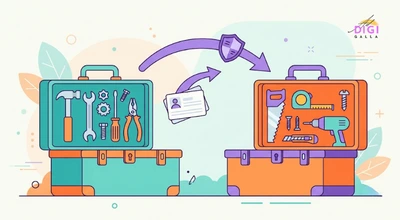
Then start sending carefully. Begin with your most engaged subscribers, so early opens and clicks build a good reputation, and widen to the rest of your list over a few sends rather than all at once. Keep an eye on bounces, complaints and unsubscribes in the first weeks.
A Hypothetical Example: A Small Store Choosing a Tool
To make this concrete, here is a hypothetical example based on common patterns, not a real client case.
Imagine a small online store with a list of around 800 subscribers that sends one newsletter a month and has no automation. The owner wants a welcome series and an abandoned cart email, but has a tight budget.
A store in this position would typically start by pricing two or three tools at the list size it expects in a year, rather than at 800. It would check whether the plan includes the automations it needs, and whether the tool connects to its store platform. It would then use the free plan or trial to build the welcome series and test it, before paying.
A store following this approach would typically revisit the choice once the list grows past its first pricing tier, since contact-based plans can jump noticeably. This is illustrative only, and the right tool depends on your own list, budget and platform.
Common Mistakes When Choosing Email Marketing Tools
- Choosing by the free plan alone. Free limits change, and a small cap can stop you right when your list starts to grow.
- Pricing for today’s list only. As shown above, costs on contact-based plans can climb sharply, so price the tool at your expected list size.
- Paying for automation you will not use. A simple newsletter does not need an advanced platform, and an advanced platform rarely pays off unless you build real flows.
- Skipping domain authentication. Without SPF and DKIM set up, your emails are more likely to be filtered, whichever tool you use.
- Hiding the unsubscribe link. Making it hard to leave increases spam complaints, which can hurt delivery for every future email.
- Treating an article as final. Prices and free limits in this category change, so confirm on the vendor’s own page before you pay.
Frequently Asked Questions
What are the best email marketing tools in 2026?
The best choice depends on your needs. Klaviyo suits online stores, Kit and MailerLite suit newsletters and creators, ActiveCampaign suits deep automation, HubSpot suits email plus a CRM, Brevo suits large lists with fewer sends, and Zoho Campaigns suits low-cost Zoho users.
What is the best free email marketing tool?
It depends on what you need from the free plan. Zoho Campaigns reports the most monthly emails, Kit the most subscribers, Brevo a daily allowance and HubSpot a free CRM alongside email. Check current limits, because free allowances change often.
How much do email marketing tools cost?
Entry plans range from free to roughly $3 to $40 a month for small lists, depending on the tool and plan. Costs rise with list size, so price the tool at the size you expect in a year. Contact-based plans can climb sharply as you grow.
Is Mailchimp still worth using?
It can be, particularly for its templates and integrations and for small lists. Its free plan is now small, and paid plans grow with your contacts, so compare it with alternatives at your expected list size before committing.
Do I need to set up SPF, DKIM and DMARC?
Google says all senders to Gmail should set up SPF or DKIM, and bulk senders of more than 5,000 messages a day need SPF, DKIM and DMARC. Most small senders are below that, but the setup still helps your emails reach inboxes.
Which email tool is best for ecommerce?
Klaviyo is built around store data and behaviour-based flows, which is why it is widely recommended for ecommerce. Cost can be a barrier for tiny lists, so smaller stores sometimes start with a lighter tool and move up later.
Can I switch email tools without losing subscribers?
Yes. Export your list with unsubscribe and bounce records, verify your sending domain in the new tool, rebuild key automations, and send first to your most engaged subscribers. Do not re-import people who have opted out.
How is this guide different from our small business email tools post?
Our email marketing tools for small business guide compares six tools with a small-business focus. This guide is organised by use case, adds HubSpot, Kit and Zoho Campaigns, and covers free plans, deliverability and switching.
Final Thoughts
The best email marketing tools for you are the ones that fit your list size, your sending habits and your sales channel, with a price you have worked out for the list you expect to have. Start from your use case, test one or two tools on their free plans, set up your sending domain properly, and confirm current prices on each vendor’s own page before you pay.
If you want help choosing a tool and building the emails that go through it, DigiAdGalla works with businesses across Delhi NCR on email, content and paid reach. See our services or get in touch to talk through your list and goals.