What is VPS hosting, and why does every website eventually need it?
If you are running your website on shared hosting and have started noticing that it loads slowly, stops working when traffic increases, or your hosting provider keeps telling you that you’ve exceeded your resource limits, you are already experiencing the problem that VPS hosting solves.
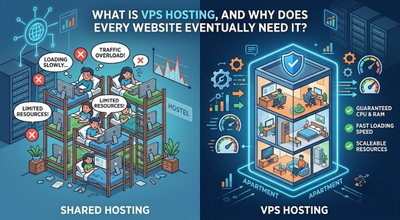
VPS means Virtual Private Server. It is a type of web hosting service in which each website has an independent section on a single physical server with guaranteed CPU, memory, and disk space, available only to that website. Unlike a shared hosting service where there are hundreds of websites competing for the same server space and resources, VPS offers you a private server space that isn’t affected by other sites’ activity.
What is VPS hosting? To understand this it is better if you see this example. Shared hosting is similar to living in a hostel where you have to share everything with strangers, costs are lower, but your peace may be disturbed by the actions of even one neighbour. A dedicated server is like having your whole building, lots of room and power at your control, but costly and more than most sites need.
VPS hosting, therefore, can be seen as a personal apartment in a secure building, where everything is yours.
Understanding what is VPS hosting is important because, in 2026, VPS hosting starts from just ₹299 per month, which means moving from shared hosting to VPS is no longer an expensive decision for businesses, startups, and bloggers.
How Does VPS Hosting Work?
To understand how VPS hosting works, there is one concept that needs to be understood which is virtualisation.
This means that there is a single physical and powerful server which is divided into several virtual servers using some software called a hypervisor. There are two kinds of hypervisor software commonly used and they are KVM {Kernel based Virtual Machine} and OpenVZ. While KVM is more powerful and has a separate operating system for each VPS, the OpenVZ is cheaper and uses a common operating system kernel.
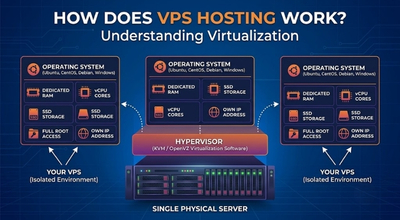
So, each individual VPS which is generated in this manner behaves exactly as the individual physical server does. Every such virtual server will have an operating system, its own amount of RAM, CPUs, storage space and IP addresses. When someone asks about VPS hosting, then it is nothing more than a virtual machine on the shared physical server managed by a hypervisor.
Here is what you get with every standard VPS plan, and why each of these features matters for a growing website:
- Dedicated RAM – 1GB to 32GB depending on plan, reserved entirely for your server
- Dedicated CPU cores – 1 to 16 vCPU cores assigned only to your VPS
- SSD or NVMe storage – your disk space is not shared with any other user
- Root access – full administrative control over your server environment
- Own IP address – your website runs on a dedicated IP, not a shared one
- Choice of OS – install Ubuntu, CentOS, Debian, or Windows Server
VPS Hosting vs Shared Hosting vs Dedicated Server
The question most people have before choosing VPS hosting is simple: how is it different from what they already have, and is it worth the upgrade?
Shared Hosting
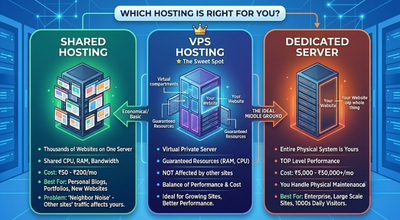
In shared hosting, thousands of websites are hosted together on one physical server by sharing the same CPU, RAM, and bandwidth. This type of web hosting is the most economical as it costs ₹50 – ₹200 per month, and it’s a perfect fit for personal blogs, portfolio websites, and any newly launched website getting less than 1,000 visits per day.
The problem of shared hosting is that if there is a sudden traffic increase of some other website of the same server, all other websites will become slower, and you can do nothing about it, which is exactly why so many site owners start looking into VPS as an alternative.
VPS Hosting
VPS hosting in India stands somewhere in between shared hosting and dedicated server, as it is quite powerful compared to shared hosting but cheaper than a dedicated server. In VPS hosting, your resources are guaranteed and do not get affected by anything. If some other website hosted on the same physical server has a sudden traffic increase, it will not affect your VPS.
Dedicated Server
With a dedicated server, you get the entire physical system all to yourself without any shared hosting with the top level of performance. However, this comes at a price range of ₹5,000 – ₹50,000 + monthly and includes physical maintenance of the hardware too. Most websites and businesses in India do not need a dedicated server until they are handling 1000+ of daily visitors, which is why VPS tends to be the ideal middle ground between shared hosting and a dedicated server.
Quick comparison:
| Feature | Shared Hosting | VPS Hosting | Dedicated Server |
| Price (India) | ₹50–₹200/month | ₹299–₹2,000/month | ₹5,000–₹50,000/month |
| RAM | Shared | 1GB–32GB dedicated | 32GB–512GB dedicated |
| CPU | Shared | 1–16 vCores dedicated | Full physical cores |
| Root Access | No | Yes | Yes |
| Performance | Inconsistent | Consistent | Maximum |
| Best For | Beginners, blogs | Growing websites, apps | Enterprise, high traffic |
What is Cloud VPS Hosting?
To understand how VPS hosting has evolved, it’s worth looking at cloud VPS hosting specifically.
As compared to the traditional hosting service, cloud VPS hosting is a development of VPS technology with improved features that fix the main drawback which is a single point of failure. In a traditional VPS hosting plan, your VPS runs on one server, therefore, any hardware issues in this server mean your website goes down until the problem is solved or fixed.
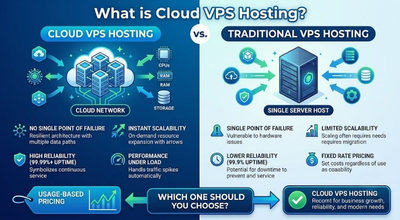
However, with cloud VPS, the system uses a network of several interconnected servers to host your VPS. So, if a server goes offline for some reason, your site will be switched to another server instantly with no additional work required from your side so your website won’t be inaccessible for any length of time.
Here is what makes cloud VPS hosting different from traditional VPS in practical terms:
Uptime – Cloud VPS hosting offers 99.99% uptime since it does not have a single point of failure due to multi server provider property. In contrast, traditional VPS offers a slightly lower percentage – 99.9% of uptime, which might seem the same but actually there is a difference that is – 99.9% allows up to 8.7 hours of downtime per year, while 99.99% allows only 52 minutes.
Scalability – With cloud VPS hosting, scaling your resources which includes adding more RAM or CPU happens in minutes without moving to a different server. Traditional VPS scaling sometimes requires a server moving, which can lead to the website not being visible to users for some time. This flexibility is a big reason businesses planning for future growth often prefer cloud VPS.
Performance under load – when your website experiences a sudden traffic increase due to a viral social media post, a product launch, or a news mention, cloud VPS automatically brings in resources from the broader cloud network to handle the load. Traditional VPS has limited performance as it can access only the resources available on its host server.
Cost structure – Cloud VPS hosting allows a usage based pricing structure, which means that users are charged based on their consumption of resources. Traditional VPS hosting is known for offering a fixed rate based on the allocation of resources.
Which one should you choose? Cloud VPS or Traditional VPS?
In most cases, especially for business owners, bloggers, and programmers, cloud VPS hosting appears to be the better option considering factors like high uptime and scalability. The cost difference between traditional and cloud VPS has reduced considerably.
When Should You Upgrade to VPS Hosting?
Knowing what is VPS hosting is only half the picture, the other half is knowing exactly when you actually need it. Here are the clear, specific signals that tell you it is time to upgrade from shared hosting to VPS:
The traffic on your website exceeds 5,000 visitors per day – At this point, the capabilities of the shared hosting starts failing. Website pages load slowly, the server response time becomes higher than normal, and during max traffic hours of the day, your website will stop responding. Shared hosting is simply not designed to handle this much volume.
Running an e-commerce website – If your website involves payments, stores customer data, or handles orders, VPS hosting will provide you with more security. Shared hosting is a weak platform, as the information from several other sites can leak into it.
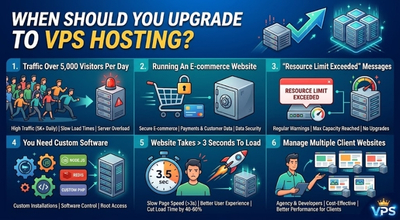
You keep getting “resource limit exceeded” messages – If your hosting provider regularly sends “resource limit exceeded” warnings or loading speed gets slow down during max traffic on the website, it means that your shared hosting is at its maximum capacity. This cannot be solved by upgrading to a better shared hosting option because it is not possible for the way it is built.
You need to install custom software – The server on shared hosting is secured and allows only a few pre-installed software to run on it. However, if your website needs certain custom PHP, particular database setup, Redis, Node.js, or other software that goes beyond the standard server stack, then VPS is the only option that will work.
Your website takes more than 3 seconds to load – Website load time is directly tied to Google’s ranking algorithms, so if your pages take a lot of time to load even after image compression and installing caching plugins, then chances are that your hosting plan is responsible. VPS can cut down your page load time by an average of 40–60%.
You manage multiple client websites – Digital marketing agencies and web developers managing 10+ client websites find that a single VPS plan is more cost effective and better performing than separate shared hosting accounts for each client.
Managed VPS vs Unmanaged VPS – Which is Right for You?
This is one of the most important decisions when choosing a VPS plan, and most beginners get it wrong. Understanding this distinction is essential for choosing the right plan for your website’s needs.
Managed VPS Hosting
Managed VPS hosting involves taking care of all server management tasks such as OS updates, server security, server monitoring, malware scanning, server backups, and basic troubleshooting by your hosting provider.
Managed VPS hosting in India is the right choice for bloggers, business owners, and digital marketers who wish to enjoy the benefits of VPS hosting without having to learn the technical aspects of Linux server management. Hosting providers such as MilesWeb, Hostinger, and Bluehost provide managed VPS hosting starting at ₹373-₹500 per month.
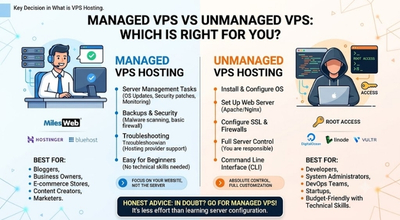
Managed VPS is best for:
- Business owners who want to focus on the website, not the server
- Content creators who are moving to VPS from shared hosting for the first time.
- Ecommerce store owners who need security and reliability but do not know how to take care of it
- Marketers managing the websites of their clients
Unmanaged VPS Hosting
Unmanaged VPS lets you manage your server from scratch, with root permissions but without anything else provided by default. You will need to install an OS yourself, set up a web server like Apache or Nginx, configure SSL certificates, set up firewall rules, apply necessary security patches and updates, do regular backups, and troubleshoot any arising problems.
Unmanaged cloud VPS service such as those offered by DigitalOcean which is $6/month for the smallest Droplets, Linode, or Vultr is the way to go if you want absolute control of your server, and know how to work with the command line interface in Linux.
Unmanaged VPS is best for:
- Developers and system administrators who have some Linux experience
- Startups building custom applications or SaaS products
- DevOps teams who want full control over the server stack
- Budget friendly users with strong technical skills.
And the honest advice would be: If you’re ever in doubt about whether you need managed or unmanaged VPS, go with managed. Because the amount of effort you might spend on studying server configuration is way more expensive than ₹100 or ₹200 per month.
If your traffic still fits comfortably within shared hosting limits, it’s worth comparing plans in our guide to the best web hosting for WordPress in 2026 before jumping straight to VPS.
Best VPS Hosting Options in 2026
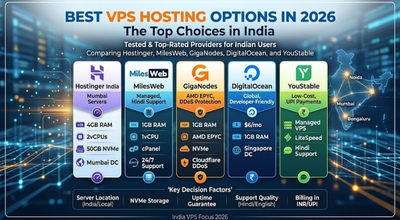
Choosing the right VPS hosting in India means looking for more than just the price. Server location, NVMe storage, uptime guarantee, support quality, and billing in INR are all factors that affect your experience with the hosting and must be considered before choosing the right one for you. Here are the best tested options available in 2026 based on their specifications and pricing.
Hostinger India VPS
Price: From ₹599/month (Hostinger’s shared hosting starts separately at ₹69/month, but this VPS-specific plan with 4GB RAM starts at ₹599)
RAM: 4GB
CPU: 2 vCores
Storage: 50GB NVMe SSD
Bandwidth: 4TB
Best for: Beginners who have decided to change to VPS hosting from shared hosting for the first time, Hostinger’s VPS employs KVM Virtualization technology, with NVME storage, provides an easy to use custom control panel, and grants full root access. Indian servers are located in Mumbai, providing lower latency to Indian users.
A very popular VPS solution among Indians due to high performance and low price.
Website: https://www.hostinger.com/in/vps-hosting
MilesWeb VPS
Price: From ₹549/month
RAM: 1GB
CPU: 1 vCore
Storage: 30GB SSD
Bandwidth: 1TB
Best for: Small businesses in India, as well as websites powered by WordPress that need managed VPS and local support MilesWeb is a trusted hosting provider with experience of more than ten years. MilesWeb provides VPS plans with cPanel, 24/7 support in Hindi and English languages both.
Website: https://www.milesweb.in/hosting/vps-hosting/
GigaNodes VPS
Price: From ₹400/month (Cloud Nano plan)
RAM: 1GB
CPU: AMD EPYC 7C13
Storage: NVMe SSD
DDoS Protection: Cloudflare Magic Transit
Best for: Providers of hardware and tech companies requiring advanced hardware at Indian rates, GigaNodes is amongst the few VPS providers in India using AMD EPYC processors and offering Cloudflare Magic Transit DDoS protection with all plans, free of cost. They use Yotta DC Noida which offers direct ISP peering with Jio, Airtel, and BSNL. GigaNodes advertises strong NVMe performance benchmarks on their own site, worth checking their current published specs directly before choosing a plan based on raw performance numbers.
Website: https://giganodes.host/
DigitalOcean (Droplets)
Price: From $6/month (~₹500)
RAM: 1GB
CPU: 1 vCore
Storage: 25GB NVMe SSD
Bandwidth: 1TB
Best for: Developers who wish to build apps and need global infrastructure, DigitalOcean is the go to name for developers around the globe. While being an unmanaged host, the user friendly interface, one click deployment, and great documentation make DigitalOcean suitable for developers familiar with Linux. Please note that DigitalOcean does not have any servers in India. Use their Singapore location for optimal latency in India.
Website: https://www.digitalocean.com/products/droplets
YouStable VPS
Price: From ₹349/month
Best for: Inexpensive managed VPS with Hindi language support and UPI payments, YouStable is a low cost managed VPS service provider that has its headquarters in Lucknow, India. They offer LiteSpeed powered web servers and accept UPI payments, and they support Hindi along with English, making them an excellent choice for people who prefer to communicate in their own language.
Website: https://www.youstable.com/vps-hosting/
Prices listed are as of July 2026 and are subject to change. Always confirm current pricing directly on the provider’s website before purchasing.
VPS Hosting and SEO – Why Your Hosting Choice Affects Your Google Rankings
This is a section of VPS hosting that most VPS hosting guides ignore but it’s something every entrepreneur or business owner whose website depends on organic search traffic should pay attention to.
According to Google, they take page speed into consideration when determining the rankings of websites via their Core Web Vitals. These include Largest Contentful Paint, which indicates how fast the primary content of your page loads, Interaction to Next Paint (INP), which measures how responsive your site feels to user interaction, and Cumulative Layout Shift, which measures unexpected layout movement while the page loads.
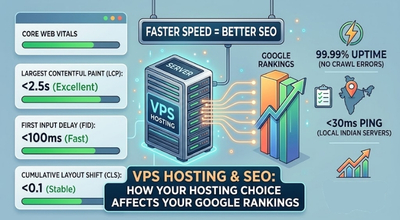
As mentioned earlier, sites that outgrow shared hosting commonly see load times improve significantly after switching to VPS, and that speed gain feeds directly into Core Web Vitals. Faster load time means improved Core Web Vitals scores which are key in improving Google rankings. For an Indian business, selecting a host with Indian servers means less than 30 ms ping rate for visitors browsing from within India. This is compared to 80 to 150 ms if hosted on servers located outside the country.
When it comes to SEO, uptime is very important, and the cloud VPS hosting offers 99.99 percent uptime. This is critical since your website will not give any crawl error because of downtime. The crawler will always be able to access your site, avoiding downtime problems and crawling errors, which are known negative SEO signals.
In short, if your website is targeting audiences and currently on shared hosting with slow load times, upgrading to a VPS is one of the highest ROI technical SEO improvements you can make.
How to Choose the Right VPS Plan – 5 Things to Check
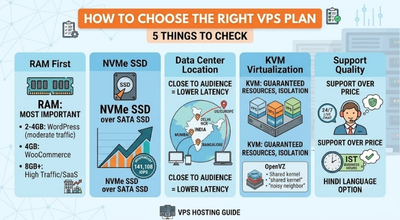
Choosing the right plan comes down to knowing which server resources actually affect performance the most. With so many providers and plans available, here is a 5 point checklist for choosing the right VPS:
1. RAM first, everything else second
RAM is the most important resource for website performance. For a WordPress website with moderate traffic of 5,000 – 20,000 daily visitors, 2 – 4 GB RAM is the minimum. For an ecommerce store on WooCommerce, start with 4GB. For a high traffic blog or SaaS application, 8GB or more. Never buy a VPS plan based only on storage size, storage is cheap, RAM shows real website performance.
2. NVMe SSD over regular SSD
In 2026, NVMe SSD storage will be the standard for quality VPS providers. NVMe is significantly faster than regular SATA SSD delivering faster queries, faster file reads, and lower server response times. GigaNodes advertises strong NVMe performance benchmarks on their own site, worth checking their current published specs directly before choosing a plan based on raw performance numbers. Always choose NVMe when available, even if it costs slightly more.
3. Data center location for websites
If your audience is primarily in for example India, choose a VPS provider with data centers in Mumbai, Delhi NCR, Bangalore, or at least Singapore. Server location directly affects latency, the physical distance between your server and your visitor’s device determines how fast your server responds to their request. International servers in the US or Europe add 100–200ms of latency for Indian users, which is a direct page speed penalty.
4. KVM virtualisation over OpenVZ
When comparing VPS hosting options, always check the virtualisation technology. KVM or Kernel based Virtual Machine gives each VPS a completely independent operating system, guaranteed resources, and better isolation. OpenVZ shares a kernel and is more susceptible to “noisy neighbour” performance issues. Almost all reputable providers in 2026 use KVM, avoid any provider still offering only OpenVZ.
5. Support quality before price
A ₹50 per month difference between two VPS plans is meaningless if one provider has 24/7 responsive support and the other leaves you waiting hours during a server crisis. For Indian businesses especially, choosing a provider with local support that is Hindi language option, IST business hours coverage, or 24/7 live chat is worth a small price premium. A server issue at 2 AM during a product launch that goes unresolved costs far more than the savings on a cheaper plan.
5 Common VPS Hosting Mistakes to Avoid
Even after understanding what is VPS hosting, these are the mistakes most first time VPS users make:
Buying unmanaged VPS without Linux knowledge
This is by far the most common mistake. Unmanaged VPS simply means that you have an empty server that requires configuring everything. You need some Linux command line knowledge to be able to install a web server, configure SSL, etc. So, if you are not a developer, always select managed VPS.
Over provisioning at the start
Many people purchase 16GB RAM and 8 core VPS, even though 4GB and 2 cores would have been enough. Always begin with the medium package and scale up once your resource consumption exceeds 70% – 80%. Every good company enables upgrading instantly.
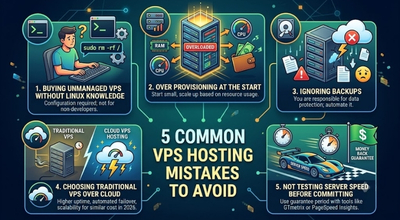
Ignoring backups
Unlike traditional hosting, VPS hosting does not automatically back up your files. You should create automated backups yourself using the tools provided by your host, such as JetBackup or R1Soft, or any other third party software you like.
Choosing traditional VPS when cloud VPS hosting costs the same
In 2026, the prices for cloud VPS hosting and regular VPS hosting are similar at the starting level. The reason why cloud VPS hosting should be chosen when both services have the same pricing is due to the higher uptime, automated failover and scalability provided by the service.
Not testing server speed before committing
Most good VPS hosting companies offer a money-back guarantee window of 7 to 30 days. Use that guarantee period to test WordPress sites and do a speed test on your server using a site such as GTmetrix or PageSpeed Insights.
FAQs
What is VPS hosting in simple terms?
VPS Hosting is a form of hosting service where a single server is divided into many smaller virtual servers through the use of virtualization software. The virtual server will be given dedicated RAM, CPU, storage space, and operating system, giving it the capability and functionality that comes with a dedicated server but for a much lower cost than a dedicated server. It is the suggested upgrade for users with shared hosting whose websites have grown too large.
What is the difference between VPS hosting and shared hosting?
Shared hosting works by letting hundreds of websites use the same resources such as the CPU and RAM of the hosting server. If one website receives too much traffic, the others would suffer by the decrease in performance. In a VPS Hosting service, resources are not shared and no website would be able to consume the RAM or CPU used up by another website.
What is cloud VPS hosting and how is it different from regular VPS?
In standard VPS Hosting, the server you use is hosted on a single computer. In the case of cloud VPS hosting, the server is hosted across multiple computers within a network and if one goes down, your VPS will switch to another, no downtime at all. Moreover, cloud VPS hosting makes it easier to scale and offers 99.99% uptime as compared to 99.9% uptime of VPS hosting. In 2026, the minimum cost of cloud VPS hosting in India is approximately ₹400/month.
How much does VPS hosting cost in India in 2026?
VPS hosting in India starts from as low as ₹299/month to ₹373/month. Most quality managed VPS hosting options range between ₹500 to ₹1,500 per month. Your pricing will depend on RAM and core requirements. A 2GB RAM, 2 core NVMe VPS hosting will be available at ₹400 to ₹800/month depending on the provider. Discounts on annual billing can vary from 20%-30%.
Is VPS hosting good for WordPress?
Yes, VPS Hosting is an excellent choice for WordPress sites, especially if your site attracts more than 5,000 visitors per day or has a WooCommerce store installed. The dedicated RAM helps avoid common issues like “memory exhausted,” NVMe SSD boosts database speed, and root access allows installation of Redis or Memcached caching plugins to increase loading speed.
Which is the best VPS hosting in India for beginners?
From options, beginners in India would benefit most from Hostinger VPS starting from ₹599 per month on promotional pricing (check current renewal rates) and MilesWeb Managed VPS starting from ₹549 per month. They both offer managed services, meaning that server management will be taken care of by someone else, they have servers in India, accept UPI payments, support other Indian payment systems, and offer 24/7 customer support. If you need WordPress hosting only, choose Hostinger, otherwise, opt for MilesWeb.
Does VPS hosting improve website speed and SEO?
Yes, and quite importantly so. In cases when websites grow beyond shared hosting packages, the switch to VPS leads to a drop in page load times in the range of 40% to 60%. Since Google evaluates page speed among other factors using its Core Web Vitals metric, faster hosting translates into higher SEO rankings. The use of providers with Indian data center locations helps achieve under 30 ms latency for Indian users.
When should I upgrade from shared hosting to VPS?
Signs pointing to this change include, regular page load times above 3 seconds, traffic exceeding 5,000 visits per day, having an ecommerce site handling payments online, getting warnings about usage limitations from your shared host, installing custom software on your site that demands root level permissions, managing a portfolio of client websites that could benefit from one consolidated hosting location.
Conclusion
So, what is VPS hosting in 2026? It is the most practical hosting upgrade for any website that has to move away from shared hosting. It gives you dedicated resources, full root access, consistent performance, and the freedom to customise your server environment, all at a price that starts from ₹299 per month in India.

VPS is no longer a premium hosting product, if your site is experiencing growing traffic, poor performance, or is an e commerce website having online transactions, you cannot afford to be on shared hosting anymore. There has never been so little difference in terms of both pricing and functionality between shared hosting and VPS hosting than now, in 2026.
For most Indian businesses and bloggers, a managed VPS from Hostinger, MilesWeb, or GigaNodes with an Indian data center is the ideal starting point. Start with a 2–4GB RAM plan, monitor your resource usage for 30 days, and scale from there.
Technical users and developers can consider cloud VPS hosting with companies such as DigitalOcean or GigaNodes.
Your hosting is the foundation every other part of your website performance is built on. Get it right, and everything else that is speed, SEO, uptime, user experience, gets better automatically.